Turn the briefing into a working system your team uses daily
Claude Cowork gives professionals building a daily AI workflow a structured process for selecting, deploying, and measuring real adoption.
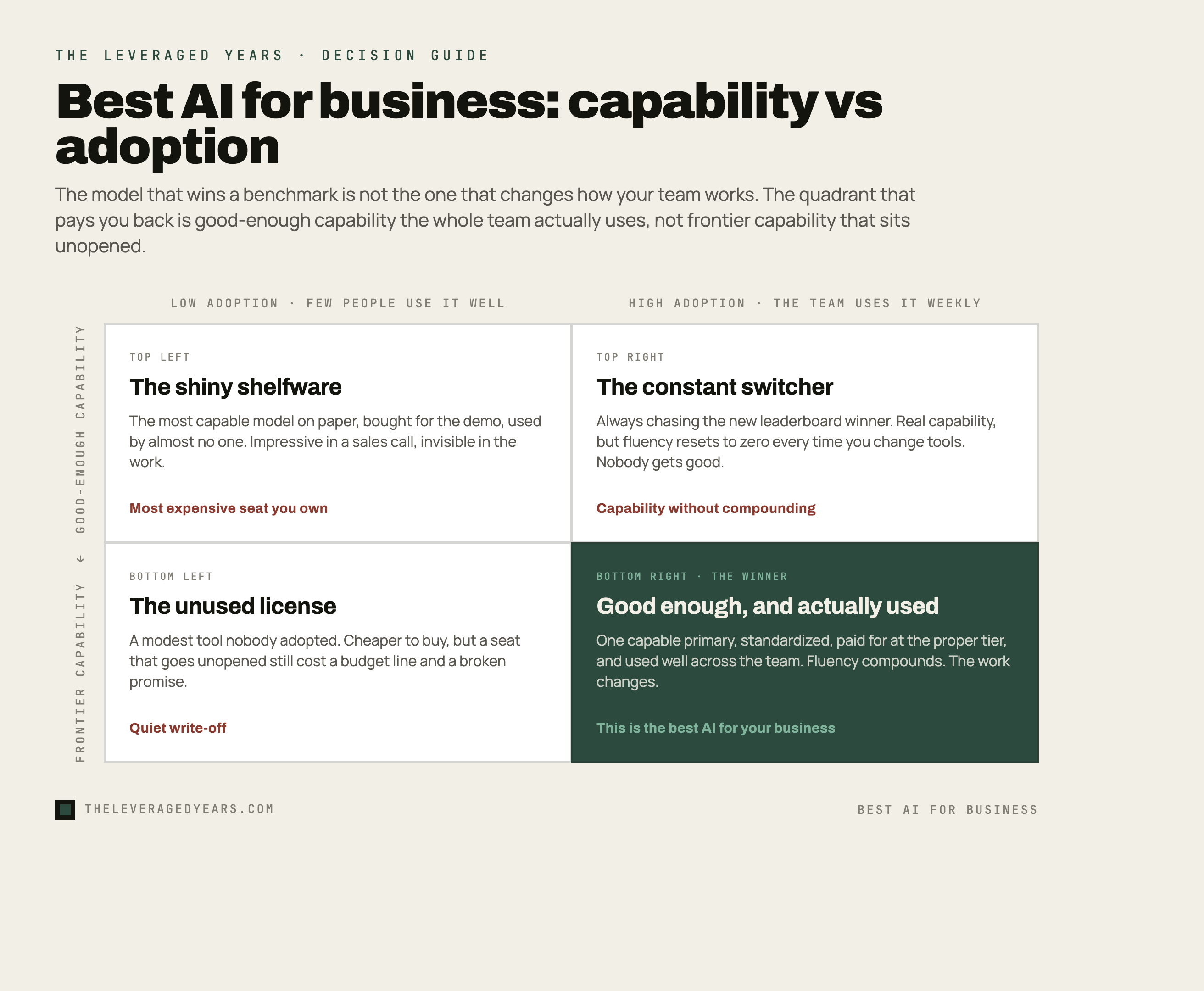
Ask ten leaders what the best AI for business is and you will get ten model names, usually whichever one made headlines that week. It is the wrong question, or at least an incomplete one. The model that wins a benchmark in a lab has almost nothing to do with the model that quietly saves your team six hours a week. The best AI for your business is not the smartest one on paper. It is the one your people will open on a Monday morning without being told to.
That sounds soft. It is actually the hardest, most expensive part of the whole thing, and the part most companies skip. A quick scope before we go further: AI is a broad field, but the focus here is the generative AI assistants now reshaping knowledge work, the tools teams use for writing, analysis, research, and thinking through problems.
Here is the uncomfortable backdrop. A widely cited 2025 report from MIT on the state of generative AI in business found that the large majority of corporate pilots, around 95 percent, delivered no measurable return on the profit and loss statement. Not because the technology was incapable. Because the rollout did not change how work actually got done. Change-management research has long found that the majority of transformation failures trace back to human factors rather than to anything technical, and AI is no exception, with user proficiency accounting for a large share of the trouble. Meanwhile employees are not waiting for permission. Recent surveys show a striking share of workers already using AI tools their employer never approved, often through personal accounts, and they tend to report doing so because the sanctioned option felt slower, harder to reach, or simply was not offered.
So the real question is not which AI is best. It is which AI your team will standardize on, trust, and use well enough to change how the work actually gets done. This briefing is about that question: the people side, the decision, and the rollout. If you want the tactical, tool-by-job rundown of which app to reach for in which situation, that is a separate piece, and we wrote it: see the best AI tools for business. This one is about adoption. The two are meant to be read together.
Why the best-model framing keeps failing teams
The benchmark obsession is understandable. Capability is visible, measurable, and easy to argue about. Adoption is invisible until it does not happen.
But capability has quietly stopped being the bottleneck for most everyday business work. The leading general assistants from the major labs are all extraordinarily good at the things most teams need: drafting, summarizing, analysis, research, rewriting, working through a messy problem out loud. The gap between the top two or three options on a normal marketing email or a board summary is small, and it is shrinking. The gap between a team that uses any of them well and a team that uses none of them is enormous.
When you over-index on the model, three predictable things go wrong. You buy for the demo, not the workflow: the tool that dazzles in a sales call may have nothing to do with how your finance lead actually closes the month. You chase the frontier and never let anyone catch up: if you switch tools every time a new release tops a leaderboard, your team never builds fluency in any of them, and proficiency that took weeks to build resets to zero. And you confuse access with adoption: buying licenses is not a rollout, and a seat that goes unused is more expensive than no seat at all, because it came with a budget line and a promise that did not land.
The fix is a mindset shift that most leadership teams resist because it feels less exciting: pick a good-enough primary, standardize on it, and pour your energy into helping people get genuinely good at using it.
How to actually choose: standardize, do not sprawl
The instinct in a lot of companies is to let a thousand flowers bloom. Marketing likes one tool, engineering another, the founder swears by a third. That feels open-minded. In practice it produces sprawl: nobody is fluent, nothing connects, your data is scattered across a dozen consumer accounts, and no one can answer a basic security question about where the company information is going.
A better default is to pick one primary assistant for the whole organization and standardize on it, then allow a short, deliberate list of specialist tools on top. When you evaluate the primary, weigh these in roughly this order.
Data handling and governance. For a business account you want clear answers on whether your inputs are used to train models, where data is stored, and what admin controls exist. Consumer free tiers usually offer worse terms than the business or enterprise plans of the same product. Two more questions a senior buyer should ask: how hard would it be to leave, meaning can you export your data and rebuild your workflows elsewhere if you switch providers, and for a regulated or global team, where exactly is data processed and stored, and are the audit logs and controls good enough to satisfy your obligations. This is not a detail to wave past.
Fit to your real work. If most of your value is long-document analysis and careful writing, weight that. If it is code, weight that. Match the tool to where your team actually spends its hours, not to a generic best-overall label.
Total cost honestly counted. Per-seat price is the easy number. The real cost includes training time, the admin overhead of managing it, and the switching cost if you change your mind in six months. Cheaper licenses with no enablement plan are usually the more expensive choice.
To make this concrete: if most of your value is writing, analysis, and reasoning over long documents, a tool strong in exactly that should be your primary, and we walk through what that looks like in practice in Claude Cowork. If you want the honest head-to-head trade-offs before you commit rather than taking anyone word for it, we did that comparison in Claude vs ChatGPT for business. The point is not that one brand wins for everyone. The point is that you choose deliberately based on your core work, pay for the proper business tier, and then commit, instead of half-using four tools at once.
Standardizing does not mean banning everything else. It means there is a default, everyone knows what it is, the company pays for the good tier, and exceptions are a short approved list rather than a free-for-all. If you want help matching the right primary and the right depth to your specific role, browse the full course catalogue.
A rollout that actually sticks
Most AI rollouts are an email with a login link and a vague hope. That is not a rollout. That is an announcement. Here is a sequence that tends to stick.
Start with a real problem, not a tool. People adopt things that make a job they hate go faster. Pick one or two painful, recurring tasks per team, the meeting notes nobody writes up, the weekly report that eats an afternoon, the first draft that always takes too long, and make the tool obviously better at exactly those. Win the specific before you preach the general.
Name owners, not just users. Adoption that depends on the founder being excited dies when the founder gets busy. Give each team a champion: someone who is genuinely into it, gets a little extra training, and becomes the person others ask. Peer help beats top-down mandate almost every time.
Make the good path the easy path. If the approved tool is harder to reach than the random one a colleague mentioned, you will lose. Single sign-on, a bookmarked link, shared prompt templates for the common jobs, a channel where people post what worked. Reduce the friction between a person and a good first result to near zero.
Show, do not tell. A live thirty-minute session where someone runs a real company task end to end beats any slide deck. Record it. Build a small internal library of here is how we do X here. Concrete and specific travels; abstract and inspirational does not.
Expect the dip and the fear. When a tool starts touching part of someone job, the honest reaction is often anxiety, not enthusiasm. People worry about looking slow, or about being replaced. Name it directly. Frame the tool as removing the tedious parts of their role so they can do the parts that actually need a human. That framing is not spin if you mean it, and people can tell the difference.
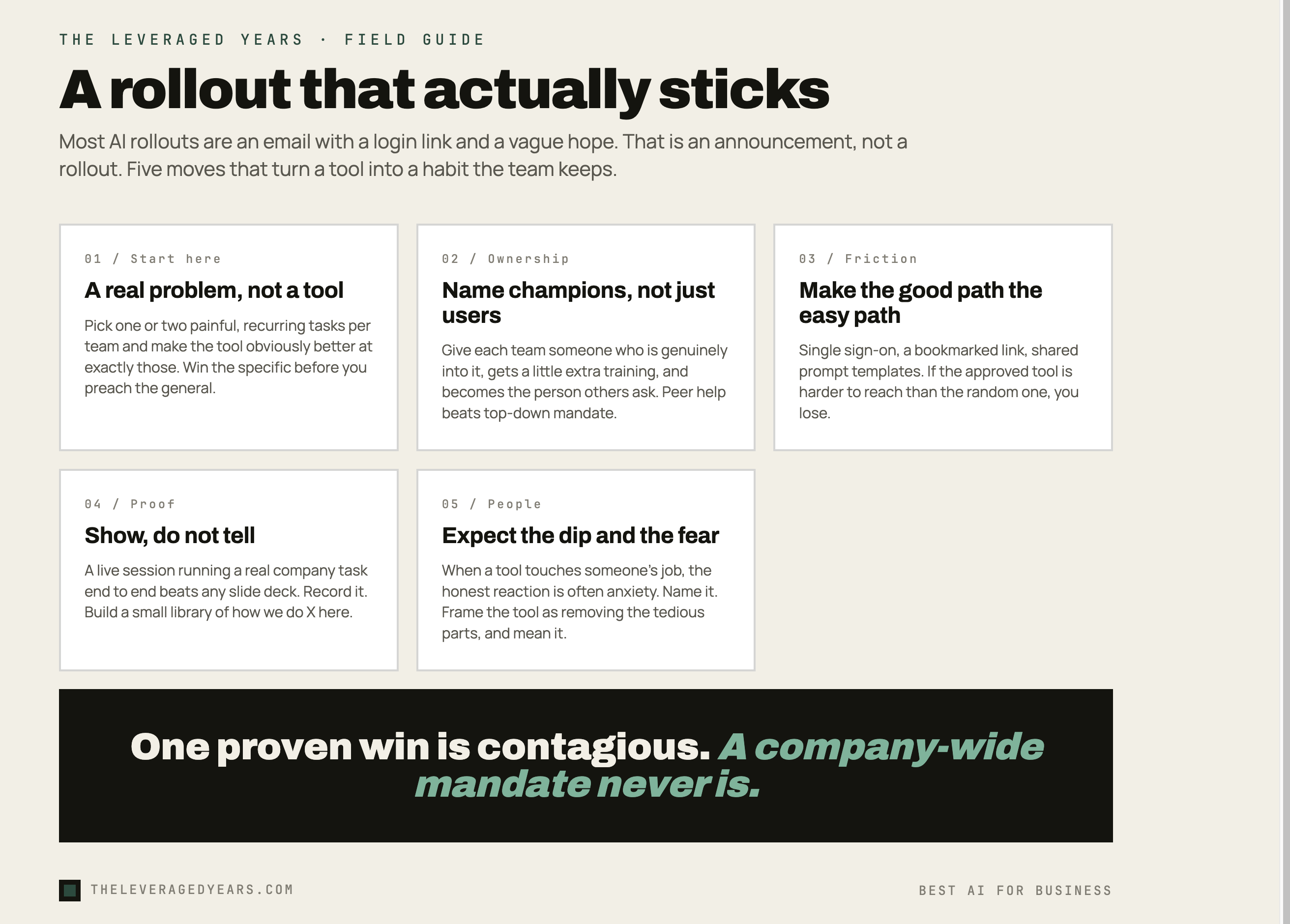
If you have already bought licenses that are sitting unused, do not start over and do not write it off. Relaunch with a much narrower scope: one team, one high-value task, one champion. A single proven win is contagious in a way that a company-wide mandate never is. Let it spread from there.
This is exactly the territory our courses are built for: not here are the buttons, but how to run a thirty-day adoption sprint, train your team champions, and build the habits that turn a tool into a measurable asset that survives a busy quarter.
Guardrails without bureaucracy
Skip governance and one of two things happens. Either people get nervous and barely touch the tool, or, far more common, they go around you entirely and paste sensitive material into whatever free app is open in another tab. The shadow-AI numbers cited earlier are not a story about reckless employees. They are a story about employees who needed help, did not get a sanctioned option that was good enough, and solved their own problem in a way that quietly created risk.
Good guardrails are light and clear, not a forty-page policy nobody reads. A short, plain-language acceptable-use note: what you can put in, what you cannot (customer data, anything legally sensitive, secrets), and which approved tool to use. One page, written like a human wrote it. A sanctioned tool that is genuinely good, because the single most effective security control is giving people an approved option that is better than the unapproved one; people route around bad tools, not good ones. A named person to ask, since most people want to do the right thing and will, if asking is easy and the answer is fast. And a human in the loop for anything that matters: AI assistants are confidently wrong sometimes, so anything customer-facing, legal, financial, or final gets a human check. Say so out loud and make it a norm, not an afterthought.
That is most of it. Governance for a normal business is a short document and a culture of asking, not a compliance department. The goal is to make the safe path also the convenient path.
Measuring whether it is actually saving time
If you cannot tell whether the tool is working, you cannot defend the budget and you cannot improve the rollout. But the metric most people reach for, license count, measures the wrong thing. Seats bought is not value created. Measure usage and outcomes instead.
Real usage. Are people actually using it weekly, and is that number climbing or flat? Most business tiers expose basic activity data. Flat usage after the launch buzz is the clearest sign your rollout stalled.
Time on specific tasks. Pick the two or three jobs you targeted at the start and ask, plainly, did this get faster. A quick before-and-after, even a self-reported one from the team, tells you more than any vendor dashboard. The monthly report went from a full afternoon to about an hour is the kind of sentence that justifies the spend.
Quality and confidence. Faster is only good if the work holds up. Ask whether output quality stayed steady or improved and whether people feel more capable, not just busier.
Stories. The qualitative ones matter more than leaders expect. The specific account of how someone used the tool to crack a problem they were stuck on does more to drive adoption across a team than any chart. Collect those on purpose and share them.
Set a simple ninety-day checkpoint: targeted tasks measurably faster, weekly usage rising, no security incidents, a handful of real stories from the team. Hit those and you have proof. Miss them and you have a diagnosis, which is almost always a rollout problem rather than a model problem.
Not sure where your team stands today? Our short AI readiness quiz is a quick way to find the gap between where you are and a rollout that sticks.