Build a multi-model system that matches tools to tasks
Practical OpenRouter teaches professionals routing AI work across models how to test, compare, and deploy the right tool for each job.
Most "best AI tools for business" lists are written to be long, not useful. They name forty products, score each one on a tidy little chart, and quietly assume you have the appetite to trial all forty. You do not. You have a calendar that is already full and a standard that is already high. What you actually want is a short answer to a narrow question: where will a piece of software give me back real hours without making me babysit it?
That is the question this briefing answers. We are not ranking tools by feature count or by how loud their marketing is. We are ranking them by the work they take off your desk, organized around the jobs senior professionals actually do all week: writing and email, research and analysis, meetings and notes, data and spreadsheets, and customer communication. For each one, you will get the category of tool that earns its keep, a plain test for judging whether a specific product is any good, and an honest note on when to walk away.
A word on tone before we start. We are skeptics here. Plenty of "AI" features are a thin wrapper over a model you could prompt yourself, sold back to you at a markup. Plenty of subscriptions get bought in a burst of enthusiasm and then renew, unused, for a year. The goal is leverage, not a longer line item on your software bill. This briefing is the field guide: it shows you which categories of tools earn their keep. If you want to go one level deeper and learn to work directly with the models most of these apps are built on, cutting out the markup entirely, our Practical OpenRouter course teaches exactly that.
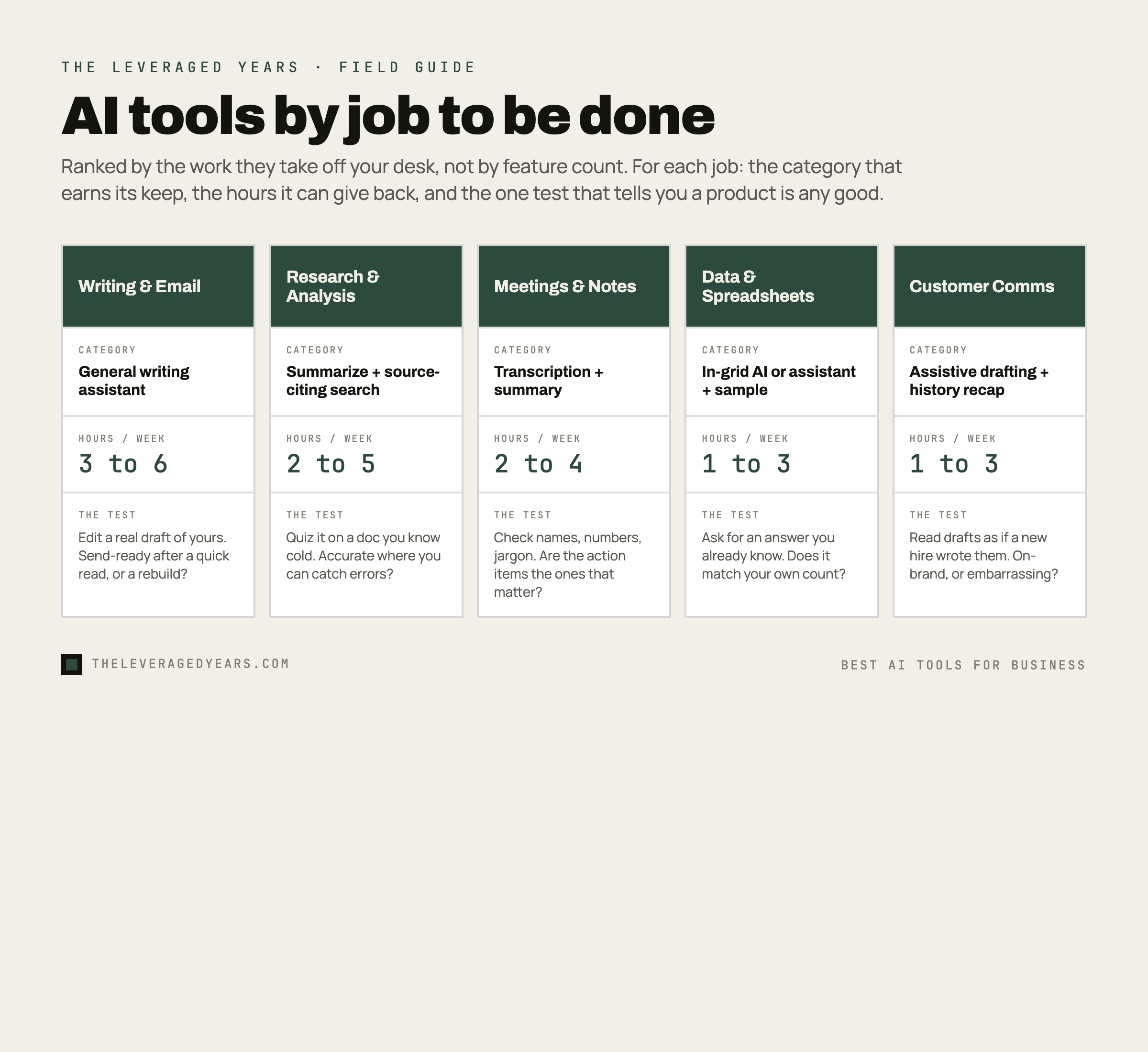
How we are ranking: hours saved, not hype
A useful AI tool clears three bars. First, it removes a task you do often enough that the time adds up. A tool that saves ten minutes on something you do twice a year is a novelty. A tool that saves ten minutes on something you do ten times a day is a raise. Second, the output needs little enough correction that you come out ahead after checking it. If you spend more time fixing the draft than you would have spent writing it, the tool is costing you. Third, it has to fit the work you already do, not demand that you reorganize your week around it.
Hold every product up to those three bars. Most fail the second one. The trick with senior work is that the bar for "good enough" is high, and a confident wrong answer is worse than a blank page, because it hides the error inside something that reads well. So throughout this briefing, the judging test for each category is really a test of trust: can you verify the output quickly, and does it hold up when you do?
One framing that helps: treat these tools as a fast, tireless junior who drafts and organizes, while you remain the one who verifies, decides, and signs. That division of labor is the whole game. It is also the safest way to use this technology in regulated or high-stakes work, where you own the result no matter who, or what, produced the first pass. For a closer look at how that division of labor reshapes the way teams work, and how to manage the transition, see our companion guide to leading a team through AI adoption, which focuses on the people and decisions rather than the tools.
Writing and email: the largest, quietest time sink
If you bill for your judgment, you still spend a surprising share of the week turning that judgment into words. Emails that need to land a certain way. The third draft of a proposal. A summary of a long thread for someone who was not on it. None of this is the work, exactly, but all of it sits between you and the work.
This is where general-purpose AI assistants earn their place first, and where most professionals should start. A capable assistant is genuinely good at the unglamorous middle of writing: taking your rough bullet points and producing a clean draft, tightening something that is too long, adjusting tone for a specific reader, or turning a messy chain of messages into a clear recap. The leading general assistants, particularly the ones from Anthropic, OpenAI, and Google, are currently very strong here. The differences between them at the frontier matter less than the habit of using one well. If you want a closer look at how the main options actually compare for professional work, our briefing on using Claude for professional work walks through where each tends to shine.
The category that saves time: a general writing and drafting assistant, used as a first-draft engine and an editor, not an author of record.
How to judge one: paste in a real piece of your own work and ask it to improve, shorten, or reframe it. If the result sounds like you on a good day and needs only light edits, it is worth keeping. If it sands your writing down into generic corporate filler, it will cost you more in rewriting than it saves. The test is whether you would be comfortable sending the output after a quick read, not after a rebuild.
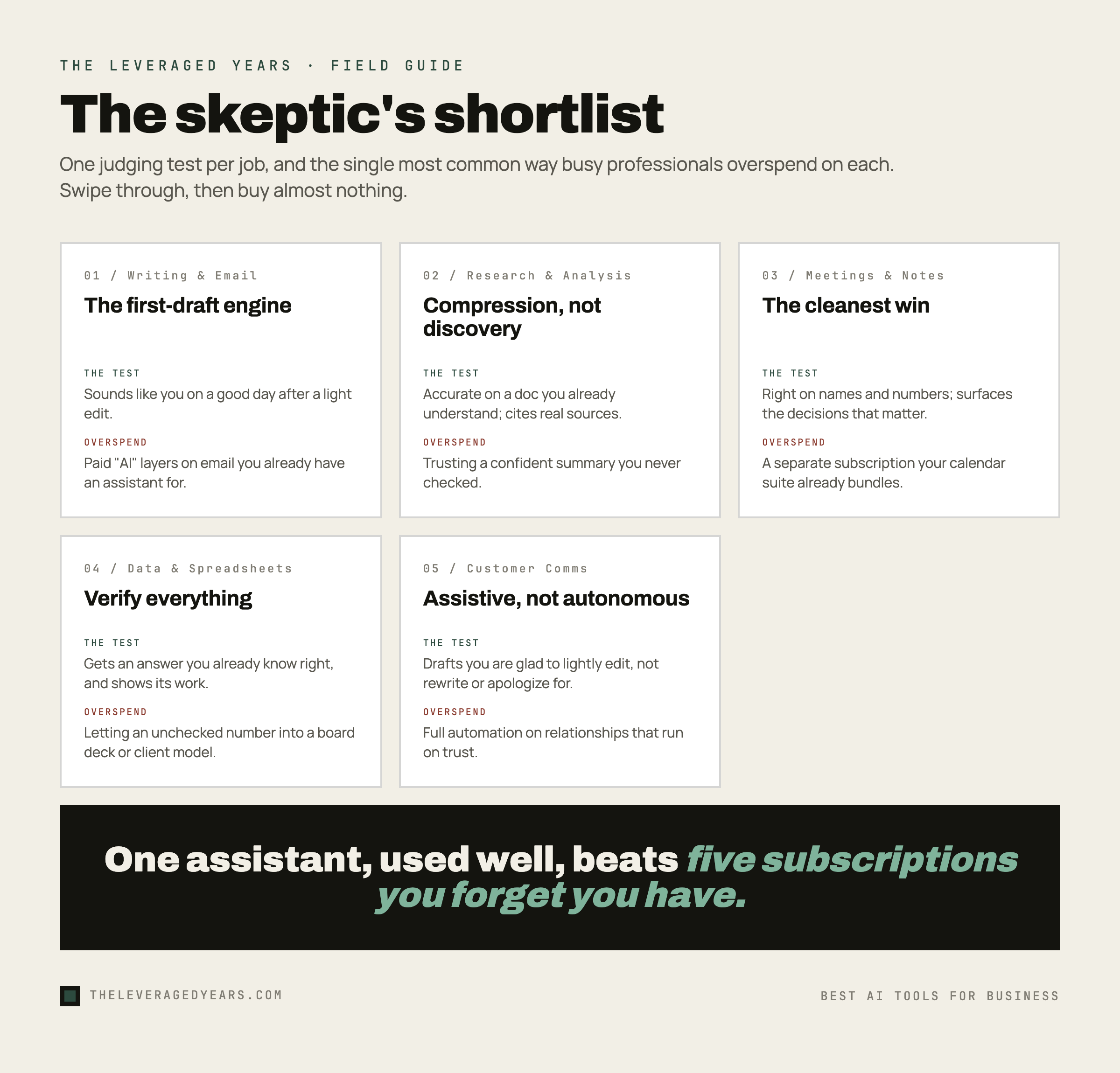
Where to be careful: email tools that promise to write and send on your behalf, or that bolt a paid "AI" layer onto features your existing assistant already covers. The drafting is the valuable part. The autopilot is where mistakes get expensive.
Research and analysis: compression, not discovery
The second great time sink is reading. Long documents, dense reports, contracts, decks, threads that have spiraled past the point of usefulness. The job is rarely to discover something new on the open internet. It is to get to the bottom of a specific pile of material, three contracts, two board decks, and a forty-page market report, faster than reading every page would allow.
The tools that help here fall into two buckets. The first is the same general assistant from the last section, now used to summarize and interrogate a document you provide: pull the key terms out of an agreement, list the assumptions buried in a forecast, surface the three things in a sixty-page report that actually change your decision. The second is AI-assisted search, which can pull current information from the web and, importantly, show you its sources so you can check them. For anything where the facts matter, a tool that cites where it got each claim is worth far more than one that simply sounds authoritative.
The category that saves time: document summarization and analysis driven by you, plus source-citing AI search for current questions.
How to judge one: give it a document you already understand well and ask a few pointed questions. You are not testing whether it sounds smart. You are testing whether it is accurate on material where you can catch the mistakes. If it invents a clause that is not there or misreads a number, you have learned something important before it mattered. For web research specifically, only trust tools that link to real sources you can open.
Where to be careful: treating a confident summary as verified fact. These tools can misstate figures and occasionally invent citations that look plausible. Use them to get to the right pages faster, then confirm anything load-bearing yourself. Compression is the win. Blind trust is the trap.
Meetings and notes: the cleanest hours you will ever recover
Of all the jobs on this list, meeting capture may offer the best ratio of time saved to effort. The reason is simple: transcription and note-taking is a well-defined task, the core technology is relatively mature, and the output is easy to verify because you were in the room.
A good meeting assistant joins or records the call, produces a searchable transcript, and gives you a structured summary with decisions and action items pulled out. For anyone who runs back-to-back calls and currently relies on memory plus scribbled notes, this is close to found money: even reclaiming five to ten minutes of note cleanup per meeting quickly adds up to several hours a week. The hours add up fast because it removes a task you were doing badly anyway. Many calendar and collaboration suites now bundle this capability, which is worth knowing before you buy a separate subscription for it.
The category that saves time: an automatic meeting transcription and summary tool.
How to judge one: check accuracy on names, numbers, and the specific jargon of your field, since that is where transcription tends to fail. Then check whether the action items it extracts are the ones that actually matter or just the last things said. A tool that captures words perfectly but misreads importance still saves you time, but you will want to scan the summary rather than trust it whole.
Where to be careful: consent and confidentiality. Recording participants has legal and professional implications that vary by where you sit, and some conversations should not be fed to an outside service at all. Sort out the policy before you switch it on, not after. If you are introducing AI tools across a team or a firm, our guide to leading a team through AI adoption covers the governance and policy questions in depth.
Data and spreadsheets: powerful, but verify everything
Spreadsheets are where AI assistance is most tempting and where it demands the most discipline. The promise is real: describe what you want in plain language and get a formula, a pivot, a cleaned-up column, or a first read on what a dataset is telling you. For anyone who is competent in a spreadsheet but not fluent, this collapses a frustrating half hour of trial and error into a minute.
There are two ways in. The major spreadsheet platforms are building AI features directly into the grid, which is convenient because the data can stay within the tool and provider you already trust. Separately, a general assistant is very good at writing and explaining formulas when you describe the problem and paste in a sample of the structure. Both can turn a thirty-minute search for the right formula into a thirty-second prompt, provided you check the result.
The category that saves time: AI assistance for formulas, cleanup, and a first pass at analysis, either inside your spreadsheet tool or via a general assistant you feed sample data.
How to judge one: ask it for a formula or a transformation where you already know the right answer, then check the result against your own count. Numbers are exactly where a plausible-sounding wrong answer does the most damage, because a bad figure in a board deck or a client model is not a typo, it is a credibility problem. If a tool gets the easy ones right and shows its reasoning, you can lean on it for the tedious middle while keeping your hand on the wheel.
Where to be careful: never let an AI-generated number into something that matters without checking it the way you would check a junior analyst's work. And think hard before pasting sensitive data into any outside service. The right tool here is often the one that keeps your data inside a platform you already use.
Customer communication: speed without losing the relationship
The last job is talking to the people who pay you, and the people who might. Drafting replies, keeping a consistent voice across a busy inbox, summarizing a long account history before a call, writing the follow-up you keep meaning to send. AI is good at the drafting and the summarizing. It is not good at being you, and customers can usually tell the difference.
The useful pattern is assistive, not autonomous. Let a tool draft the reply and surface the relevant history, then send it through your own judgment before it goes out. For higher-volume, lower-stakes questions, AI-assisted support and help-desk tools can handle the genuinely repetitive cases and route the rest to a human, which is a real saving if you have the volume to justify it. The mistake is pointing autonomous AI at relationships that depend on trust and hoping no one notices the seams.
The category that saves time: AI-assisted drafting and customer-history summarization, with a human approving anything that reaches a client.
How to judge one: read the drafts as if a new hire wrote them. Are they accurate, on-brand, and free of the confident filler that makes a reply sound automated? A tool that drafts something you are glad to lightly edit is a keeper. A tool that produces replies you have to rewrite, or worse, replies you would be embarrassed to have sent, is a liability dressed as a convenience.
Where to be careful: full automation on anything relationship-sensitive, and any tool that makes promises or states facts to a customer without a human in the loop. The cost of one confidently wrong automated reply to an important client can erase a year of saved minutes.
The discipline that matters more than the tool list: do not over-subscribe
Here is the part the listicles skip, because it works against their affiliate links. The most common AI mistake among busy professionals is not picking the wrong tool. It is owning too many.
Notice how much of this briefing pointed back to the same thing: a single capable general assistant. It handles a large share of writing, research, and analysis on its own. Many of the specialist tools you might reach for are wrappers around the same underlying models, repackaged for one task and charged for separately. Before you add another subscription, ask whether the assistant you already pay for does the job nearly as well with a slightly better prompt. Often it does.
This is also the entire premise behind working at the model layer rather than the app layer: when you understand that most of these products are the same few models underneath, you stop paying five times for one capability. Our Practical OpenRouter course teaches exactly that: how to work directly with the strongest models so you need fewer subscriptions, not more. If the idea of a model router is new to you, our briefing on what OpenRouter is is a good place to start.
The honest shortlist, then, is shorter than you were promised. Get fluent with one general assistant. Add a meeting tool if you live in calls. Use your spreadsheet platform's built-in AI for data, and keep customer-facing work assistive rather than automated. That covers the great majority of the hours a senior professional can realistically reclaim. Everything beyond it should have to earn its place against the same three bars: a frequent task, a trustworthy output, and a fit with the work you already do. If you want help matching the right tools and the right depth to your specific role, browse the full course catalogue or take the two-minute course finder quiz.