What Is OpenRouter, and How Can You Use It to Pay Less for AI?
OpenRouter is one door to hundreds of AI models, with no subscription and no markup. A plain guide for non-technical professionals to pick the right model and pay less.
If you already pay for ChatGPT or Claude, there is a good chance you are spending more than you need to, and getting less choice than you deserve. You picked one tool, you pay one monthly fee, and you use that one tool for everything, whether the job is a quick email or a careful research summary. That is a bit like keeping a single restaurant on speed dial and ordering from it for breakfast, lunch, dinner, and every snack in between, no matter what you are hungry for.
There is a calmer way to work. It is called OpenRouter, and once you understand it, you get two things at once: a much wider set of AI models to choose from, and a clear way to spend less. This briefing walks you through what OpenRouter actually is, why your current AI bill is probably higher than it needs to be, and how a non-technical person can start using it in about fifteen minutes without writing a single line of code.
One honest note before we begin. OpenRouter does not pay us a commission. We point to tools we actually use. When we tell you to check a live page for the current price or model count, that is because those numbers change often, and we would rather you see the real figure than trust a stale one from us.
Pick the right model for each task and control costs
Practical OpenRouter shows professionals routing AI work across models how to select, test, and deploy the most cost-effective option for each use case.
What OpenRouter actually is
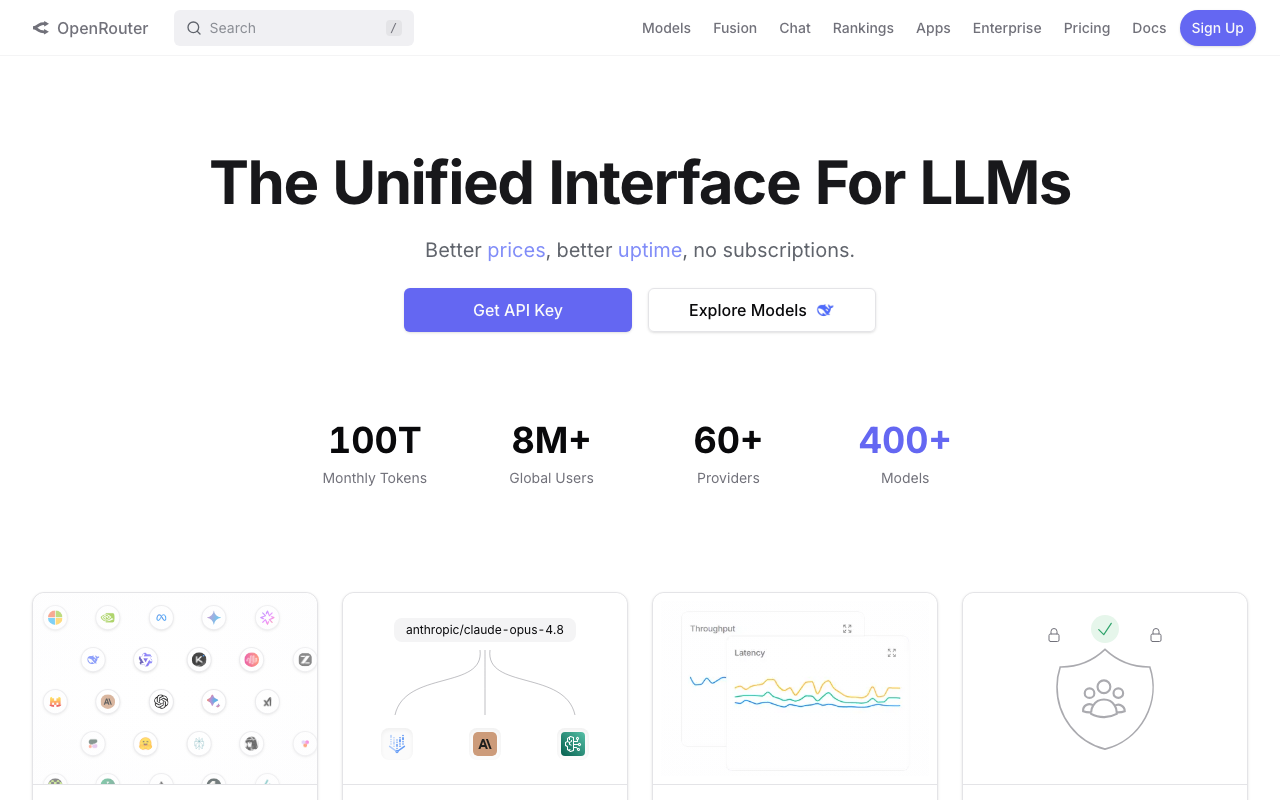
OpenRouter describes itself as "The Unified Interface For LLMs." LLM just means large language model, which is the technical name for the kind of AI behind ChatGPT, Claude, Gemini, and the rest. So in plain words, OpenRouter is one door that leads to a great many of these AI models at once.
Here is the analogy that makes it click. Imagine a food hall where dozens of kitchens cook behind a single counter. You walk up to one menu, you read what each kitchen offers and what it costs, you place your order, and the right kitchen makes your meal. You do not need a separate membership card for the pizza kitchen, the sushi kitchen, and the sandwich kitchen. One counter, one bill, every kitchen.
OpenRouter is that single counter for AI. Its homepage advertises hundreds of models from dozens of providers. On the day you read this it might say a number like "400+ Models" and "60+ Providers," but that count climbs as new models are added, so do not take my word for it. Open openrouter.ai and read the live figure yourself. The point is not the exact number. The point is that instead of being married to one AI company, you can reach across many of them from one account. If you would rather start from finished products than wire up models, here are the best AI tools for getting real work done.
The company behind it puts its promise in six words on the homepage: "Better prices, better uptime, no subscriptions." We will get to each of those.
The part that matters most for someone who does not code is this. OpenRouter has a plain web page at openrouter.ai/chat where you can type to these models in a browser, the same way you already type to ChatGPT. No programming, no setup files, no developer tools. You sign in, you pick a model, you start typing. That chat page is your way in, and it is where everything in this briefing happens.
Why your AI bill is higher than it needs to be
Most people overpay for AI for a simple reason. They use one expensive model for every task, including the easy ones.
The big AI tools you know are priced as a flat monthly subscription. You pay the same amount whether you used the tool twice or two hundred times that month, and whether your questions were trivial or genuinely hard. That feels simple, and simple has value. But it also means the cost of the most powerful model is baked into every single thing you do, even when a far cheaper model would have done the job just as well. To match the task to the right tier, see how the best AI models compare on cost and capability.
Behind the scenes, AI is not priced as one flat rate. It is priced by the amount of text that goes in and comes out, measured in something called tokens. A token is roughly a chunk of a word. Models charge a price per million tokens of input (what you send) and a separate, usually higher, price per million tokens of output (what the model writes back).
The gap between a budget model and a top-tier model is enormous. To give you a sense of scale, illustrative figures from OpenRouter's own model pages show a budget model costing a fraction of a dollar per million output tokens, while a frontier model at the top of the range can cost many dollars for the same million tokens. On output, a frontier model can run on the order of a hundred times the price of a budget model for the same volume of writing. Please treat those as rough anchors and check the live numbers, because they move. The lesson holds either way: when you run an easy task on the most expensive model, you can be paying a hundred times what the task was worth.
OpenRouter helps with this in three ways.
First, it lets you match the model to the task. Quick draft, cheap model. Hard reasoning, stronger model. You decide per job instead of paying top rate for everything.
Second, OpenRouter charges no markup on the token prices themselves. Its FAQ states it plainly: "We pass through the pricing of the underlying model providers without any markup, so you pay the same rate as you would directly with the provider." There is a small fee when you buy credits, which we will cover honestly in a moment, but the per-token price is the provider's own price.
Third, there is no subscription. OpenRouter works on pay-as-you-go credits. You load some money, and you draw it down only as you use models. If you have a quiet month, you spend almost nothing. No flat fee sitting on your card whether you used it or not.
How to start in 15 minutes (no code)
You can get going today without help from anyone technical. Here is the path, step by step.
Step 1: Create your account
Go to openrouter.ai and sign up. You can use an email address or sign in with a Google account. You do not need to enter a credit card to begin, and new accounts get a small free allowance plus access to free models so you can try things before you spend a cent.
Step 2: Add a small amount of credit (only when you are ready)
When you want to use the paid models, you add credits. This is pay-as-you-go, not a subscription, so think of it like topping up a prepaid card. OpenRouter has a minimum purchase to access paid models, which has been around five dollars, and it charges a small percentage fee when you buy credits (on card purchases this has been roughly five and a half percent with a small minimum). Both of those figures are set by OpenRouter and can change, so read the exact numbers on the purchase screen before you confirm. I suggest starting with the smallest amount that gets you going. You do not need a big balance to learn.
Step 3: Open the chat
Go to openrouter.ai/chat. This is the browser-based chat page, and it works much like the AI tools you already know. There is a model picker (you can open it quickly with Cmd+K on a Mac or Ctrl+K on Windows), a box to type your message, and the conversation appears on screen.
Step 4: Pick a model and send your first message
Open the model picker and choose a model. If you want to spend nothing while you practice, type "free" in the model search to filter to the free models. Free models have low rate limits, meaning you can only send so many messages in a given window, but they are fine for learning. Type a real question and send it. That is it. You are using OpenRouter.
Step 5: Glance at your usage
OpenRouter keeps an activity view that shows your requests, which models you used, and what you have spent. Make a habit of looking at it now and then so your spending never surprises you. The exact labels on the page may differ slightly from what I describe here, so have a look around your account settings. The reassuring part is that there is a running record, and you control it.
That is the whole on-ramp. Account, a little credit when you are ready, the chat page, a model, a message. Most people are sending useful prompts inside fifteen minutes.
If you would like a slower, hand-held version of this with screenshots, checklists, and a safe first task, that is exactly what we built our course, Practical OpenRouter, to do. It is a chat-first course for people who do not code and who want control over both cost and quality.
How to pick the right model
This is the skill that saves you the most money, and it is mostly common sense once someone says it out loud.
Think of AI models on a sliding scale. At one end you have models that are cheap and fast. At the other you have models that are slow and powerful. Neither end is "better." They are tools for different jobs.
Cheap and fast models are excellent for routine work. Tidying up a paragraph. Summarizing a page of notes. Turning a rough list into a clean one. Drafting a polite reply. Sorting items into categories. These tasks do not need deep reasoning. They need a competent, quick helper, and a budget model is exactly that, at a tiny fraction of the cost.
Slow and powerful models earn their keep on genuinely hard thinking. Working through a tricky contract. Reasoning across a long, messy document. Catching a subtle logic error. Writing something where the quality really has to be there. For these, paying more is worth it, because a weak answer that you have to redo costs you more in the end.
So the rule is simple to say and powerful to follow: use the cheapest model that is good enough for the job in front of you. Reserve the expensive models for the work that actually needs them.
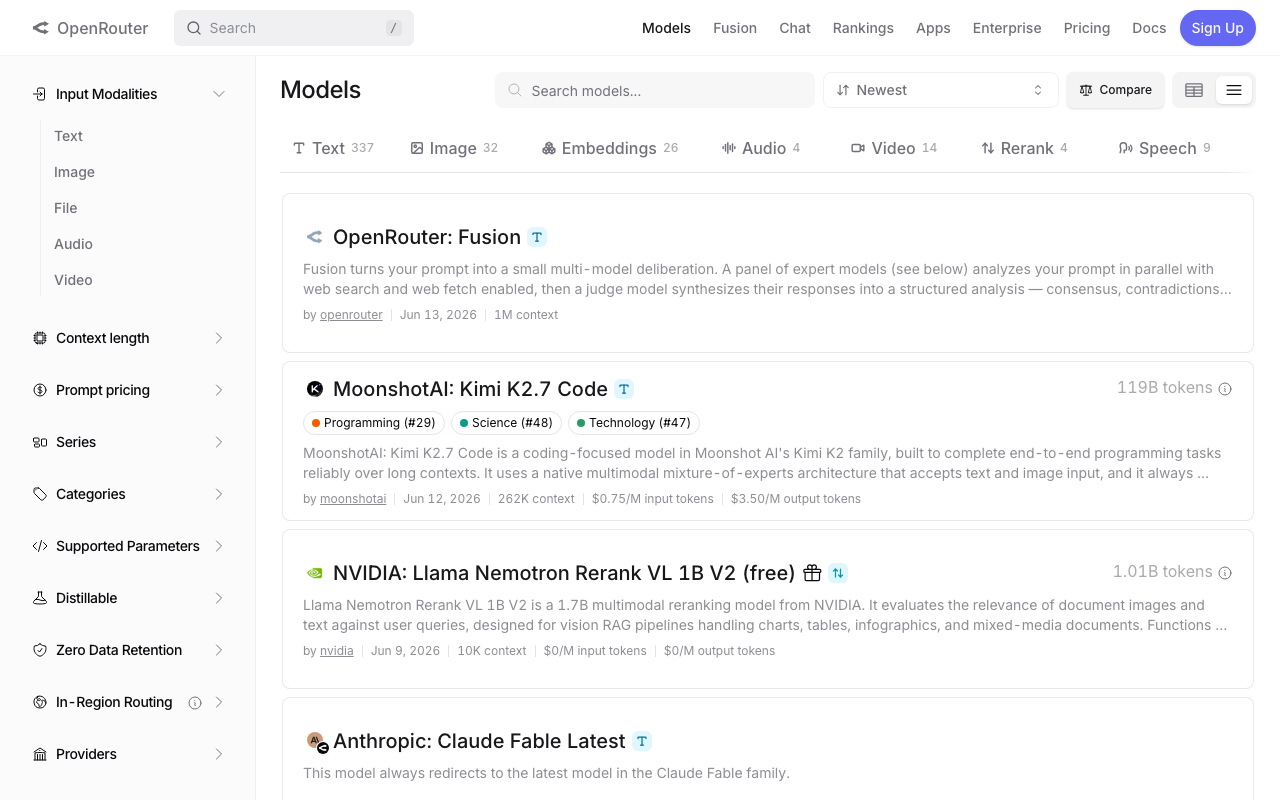
To choose well, you need to read a model's page, and OpenRouter makes that readable. Each model shows who makes it, its price per million input tokens, its price per million output tokens, and its context length, which is the maximum amount of text it can hold in mind at once. Bigger context means it can read a longer document in one go. When you do not need a huge document loaded, a model with a smaller context window is often cheaper, and that is a fair trade.
A practical move: pick three to five models you trust and keep them as your shortlist. One cheap workhorse for everyday tasks, one mid-range model for solid drafting, and one strong model for the hard cases. You do not need to know all of the hundreds. You need a small, reliable bench you can call on.
A real example: Dana drafts a proposal
Dana is fifty-two and runs her own consulting practice. She writes proposals all week. A good proposal needs structure and judgment, but the first draft is mostly assembling what she already knows into a clean shape. That is a perfect job to start cheap and only step up if needed.
Dana opens openrouter.ai/chat, picks a solid mid-range model, and pastes a prompt like this:
You are helping me, an independent consultant, draft a client proposal. Here are my rough notes: [PASTE YOUR NOTES]. Write a clear, professional proposal with these sections: the client's situation, the work I will do, the timeline, and the price. Keep the tone warm and plain. Do not invent any facts I did not give you. Where you need a detail I did not provide, mark it as [NEEDS INPUT] instead of guessing.
That last line matters. By telling the model to flag missing details rather than make them up, Dana keeps herself in the editor's chair. The model gives her a structured first draft in seconds. She reads it, fills in the bracketed gaps, fixes the tone in two spots, and she is done in a fraction of her usual time.
If a particular proposal is high-stakes, Dana can take the same notes and run them through a stronger model, or compare two side by side, which we will cover shortly. But for most of her weekly proposals, the affordable model is good enough, and she pays accordingly.
A real example: Marcus turns a report into an SOP
Marcus is forty-eight and manages operations. He often gets a long, messy report from a team and needs to turn it into a standard operating procedure, the step-by-step document his staff can actually follow. This is structured, repeatable work, which means a cheaper model handles it well most of the time.
Marcus opens the chat, picks his everyday workhorse model, and pastes:
Turn the report below into a clear standard operating procedure. Use numbered steps in the order someone would actually do them. Each step should be one plain action. Add a short "before you start" checklist and a "common mistakes to avoid" list at the end. Use only what is in the report. If a step is missing, write [GAP: describe what is missing] so I can fill it in. Report: [PASTE THE REPORT]
He gets back a tidy, numbered procedure with a checklist and a gaps list showing exactly where the original report left holes. Marcus fills the gaps from his own knowledge, and a document that used to eat an afternoon is now a twenty-minute review job.
Notice what both Dana and Marcus do. They never let the AI invent facts, they always read and correct the output, and they choose a model that fits the difficulty of the task. That is the whole discipline, and it is more about judgment than about technology.
Model Fusion in plain words (beta)
OpenRouter has a feature called Model Fusion, and at the time of writing it is in beta, meaning it is newer and still being refined. It is worth knowing about because it is genuinely useful for hard research questions.
Here is the idea without the jargon. Instead of asking one model and trusting its single answer, Model Fusion asks a panel of several models the same question at the same time. Each one answers on its own. Then a separate "judge" model reads all of those answers together and looks at where they agree, where they disagree, and where one of them spotted something the others missed. The judge then writes one combined answer that draws on the best of the panel.
Think of it like getting a question reviewed by a small committee rather than a single advisor, and then having a careful editor pull their views into one sound summary. The disagreements are often the most useful part, because they show you where the answer is not settled and deserves a second look from you.
OpenRouter has published a claim that a panel of cheaper models, fused this way, outscored some of the strongest individual models on a set of complex research tasks, at roughly half the cost. That is the company's own benchmark, so hold it lightly, but the underlying point is sound: several modest models, compared and combined, can beat one expensive model on hard, open-ended questions.
You reach Model Fusion through the OpenRouter site, no code required. It is most worth using when the question is genuinely hard and the stakes are high enough to justify running several models at once. For a quick email, it is overkill, and a single cheap model is the better call.
What to never put into a public AI tool
This part is short, and it is the most important section in the whole briefing.
There are things that should never go into any AI chat tool, OpenRouter included. Never paste passwords, banking details, social security or national ID numbers, client records that identify real people, medical information, signed legal documents, or trade secrets. If leaking it would embarrass you, harm a client, or break a confidentiality agreement, it does not belong in a chat box.
The reason is simple. By default, OpenRouter does not store your prompts and responses, which is good. But your request is still being handled by an outside model provider, and depending on your settings the default routing can include providers that may use data to train their systems. OpenRouter gives you controls in your account settings to opt out of training, to restrict to providers that keep no data, and more. Those controls are worth setting up.
But here is the honest rule that protects you no matter what the settings say: do not upload anything you would not want a stranger to see. If you need the AI's help with sensitive material, redact it first. Replace real names with "Client A," swap real numbers for made-up ones, and work with a sanitized version. You will get the same quality of help on the structure and the writing without ever exposing the real details.
This never-upload habit is not about fear. It is about staying in control, the same way you would not email a confidential file to an address you do not fully trust.
When OpenRouter is NOT the right choice
We use OpenRouter, and we still tell people honestly when it is the wrong tool. A few cases.
If you only ever use AI for one simple thing, and a single flat subscription already covers it for a price you are happy with, you may not need the extra choice. Simplicity has real value, and switching for the sake of switching is not progress.
If you rely on specific features that live inside one particular product, such as a custom assistant, a voice mode, or a deep integration with your other software, a direct subscription to that product may serve you better. OpenRouter is about reaching many models; it is not a clone of every feature each company builds around its own model.
If you are a complete beginner who has never used an AI chat tool at all, start with one friendly tool first and get comfortable. OpenRouter rewards a little experience, because its strength is choosing between options, and you choose better once you have used a model or two.
And if you need very high, steady volume, the free models will not carry you, because they have firm rate limits. That is fine. It just means you will be using paid credits, and you should pilot your real workload before assuming a cost.
Knowing when not to use a tool is part of using it well. If you want help thinking through where you fit, our short take our 2-minute quiz can point you to the right starting place.
How much can you really save?
Here is the honest answer, with no promises.
The savings come from two habits, not from magic. The first is matching the model to the task, so easy work runs on cheap models and you stop paying frontier prices for routine jobs. The second is paying only for what you use, because there is no monthly subscription draining your card during slow weeks.
For someone who currently runs every task through one premium subscription, and whose work is mostly everyday drafting, summarizing, and tidying, the difference can be large, because so much of that work can move to inexpensive or even free models. For someone whose work is genuinely hard most of the time and needs top models anyway, the savings are smaller, and that is the truth.
I am not going to hand you a percentage, because your number depends entirely on what you do and how you do it. Anyone who promises you a fixed saving without seeing your work is guessing. The reliable way to find your number is to load a small amount of credit, run your real tasks for a week while watching the activity view, and compare. The method is what saves money. The exact figure is yours to discover.
If you want that method laid out step by step, with a model shortlist, a monthly cost-control routine, the privacy settings done properly, and the same worked examples Dana and Marcus used, that is the heart of our course, Practical OpenRouter. It is built for people 40 and over who want the control without the technical headache. You can also browse our other browse our courses if a different topic fits you better right now.
Frequently asked questions
Do I need to know how to code to use OpenRouter?
No. The chat page at openrouter.ai/chat works in your browser like any AI chat tool. You sign in, pick a model, and type. The code-based side exists for developers, but you never have to touch it.
Is OpenRouter a subscription?
No. It is pay-as-you-go. You buy credits and draw them down as you use models. In a quiet month you spend almost nothing. There is a small fee when you purchase credits and a minimum purchase to access paid models, and both are shown on the purchase screen, so check the current figures there.
Does OpenRouter mark up the price of the models?
No markup on the token prices. Its FAQ states you pay the same per-token rate you would pay the provider directly. The only added cost is the small fee charged when you buy credits.
Are there really free models?
Yes. There are free models you can use at no token cost, which is a fine way to learn and to handle light tasks. They come with low rate limits, so they are not suited to heavy, steady volume, but for practice and small jobs they are genuinely free.
Is it safe to put my work into OpenRouter?
By default OpenRouter does not store your prompts and responses, and it offers settings to opt out of training and to restrict to providers that keep no data. Even so, follow the never-upload rule: keep passwords, client records, and anything truly confidential out of any AI tool, and redact sensitive material before you paste it.
How is this different from just paying for ChatGPT or Claude?
Those are single tools with one model family and a flat monthly fee. OpenRouter is one account that reaches hundreds of models from many providers, with no subscription and no markup on token prices. It gives you choice and pay-per-use pricing instead of one model and one flat bill.
What is the Auto Router?
It is a feature where you let OpenRouter pick the model for each request instead of choosing yourself. It is handy when your tasks vary a lot, since it tries to match an appropriate model to each prompt. You still pay the standard rate for whichever model it selects, with no extra fee for the routing.
Will OpenRouter definitely save me money?
Probably, if much of your work is routine and you currently run it all through a premium tool, because that work can move to cheaper or free models. But there is no guaranteed figure. The honest way to find your number is to run your real tasks for a week and compare. The saving depends on what you do.
OpenRouter does not pay us a commission. We point to tools we actually use. If this briefing was useful and you want the full, step-by-step version with screenshots and exercises, take a look at our course, Practical OpenRouter.
One clear briefing a week on the AI moves that affect your work
Plain English, written for working professionals. Each issue gives you what changed, why it matters for your field, and one ten minute win you can use the same day. No noise, no hype.
Want the full playbook behind these briefings? The Leverage Club is a working library of briefings, prompts, and quick wins with a member feed. Forty nine dollars a month, or free while you are enrolled in any course.