Stop paying for capabilities you don't need on every task
Practical OpenRouter shows professionals how to route work across models based on task requirements, not vendor loyalty.
Somewhere in the last two years, "which AI model is best" became the wrong question, and almost nobody told you. The leaderboards still update every few weeks. A new model tops a benchmark, the press release calls it the smartest thing ever built, and a fresh wave of "best AI models" lists rushes out to reshuffle the rankings. If you actually have work to do, this is noise. The model that wins a math olympiad benchmark in a lab has very little to do with the model that drafts your client email well, and the gap between the top three or four families on most everyday professional work is now small enough that picking by leaderboard is a waste of your attention.
This briefing is a buyer's take, not a leaderboard. We are going to talk about the leading model families, the actual underlying engines, not the apps wrapped around them. What each one is genuinely good at, where it quietly lets you down, how to choose for your kind of work, and why the smartest move in 2026 is usually to not marry one model at all. The goal is leverage and a smaller software bill, not bragging rights about which frontier lab you back.
One boundary before we start, so you read the right piece. This briefing is about models, the engines. If you want named apps and tools sorted by category, the writing assistant, the meeting notetaker, the research app, read our companion guide to the best AI tools, which covers the products built on top of these engines. The reason the split matters: choosing a tool is choosing a feature set and a price, while choosing a model is choosing the actual intelligence doing your work, and a single good model decision quietly improves every tool you run on top of it. This briefing stays one layer down, at the models themselves. The two pieces are meant to be read together.
Here is a simple test for which one you want right now. If you are asking which AI notetaker to buy or what the best AI writing assistant is, you want our guide to the best AI tools. If you are asking which engine should run underneath your tools, or how to stop paying separate monthly fees for several apps that all lean on the same model, you are in the right place.
First, what a "model" actually is, and why it matters to your wallet
When people say best AI model, they sometimes mean the app, ChatGPT, Claude, Gemini, and sometimes mean the engine underneath. The distinction is the whole game for a buyer.
A model is the trained system that does the thinking: it takes your text and produces an answer. A family is a lab's lineup of those models, usually a big flagship for hard problems and smaller, cheaper, faster versions for routine work. An app is the polished interface a company sells around its models, with a subscription, a chat window, file uploads, and so on.
Here is why that matters when you pull out a credit card. Most of the value, and most of the cost difference, lives at the model layer. Two apps can run the same underlying engine and charge wildly different prices, because you are partly paying for the wrapper. And within a single lab, the difference between the flagship and the smaller sibling is enormous in cost while often being trivial for the task in front of you. If you only ever use the most expensive flagship through a fixed monthly app, you are very likely overpaying for routine work. Knowing the difference is the first step to not getting fleeced.
The frontier families, honestly assessed
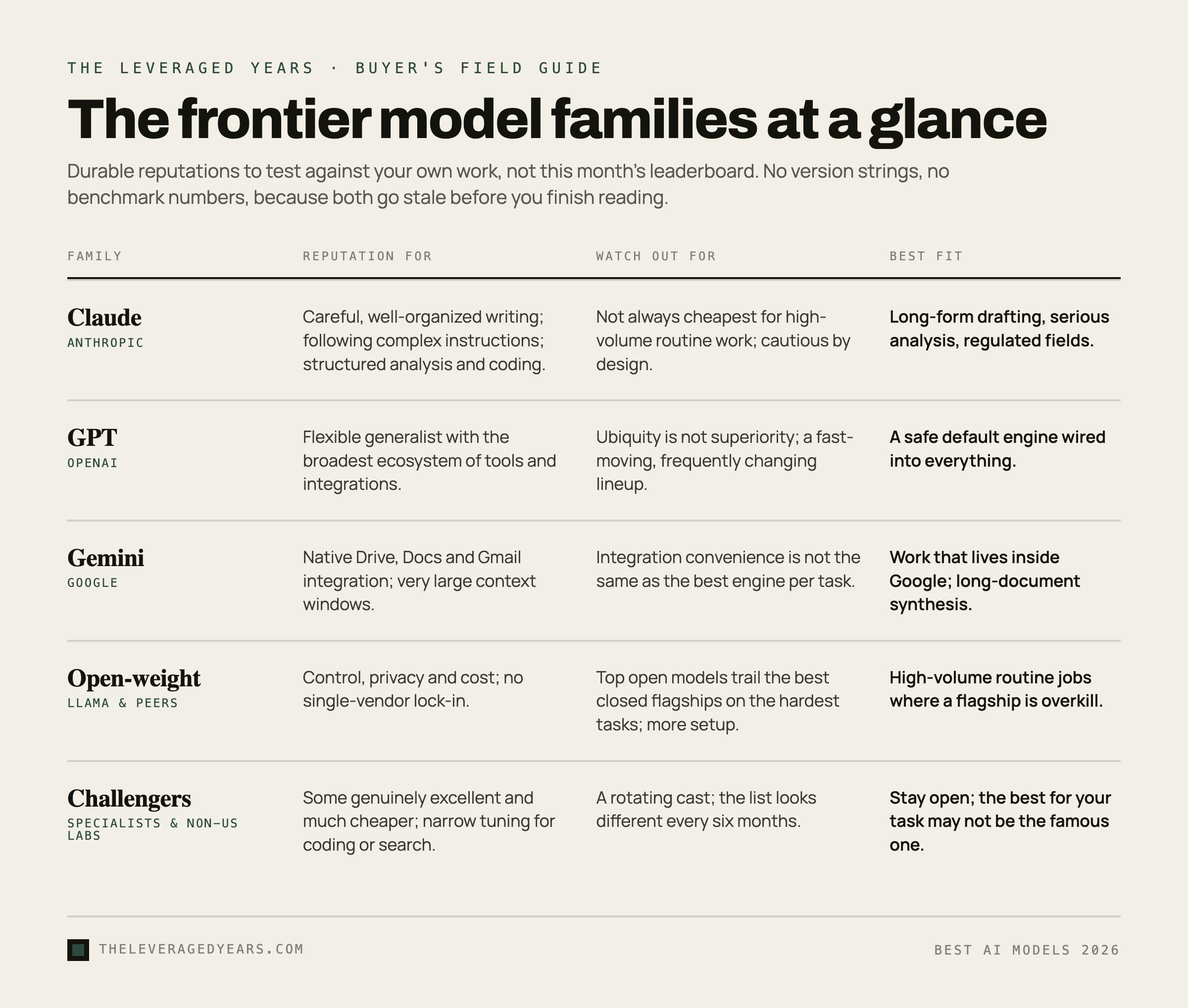
A few labs sit at the front of the pack, and their flagship models trade the lead constantly. We are going to describe them by their durable reputation rather than this month's benchmark, because the specific rankings churn and any number we printed would be wrong by the time you read it. Treat these as starting reputations to test against your own work, not verdicts.
Claude, from Anthropic
Claude has built a reputation among professionals for careful, well-organized writing and for following complicated instructions without going off the rails. People who do a lot of long-form drafting, structured analysis, and serious coding tend to reach for it because the output needs less cleanup and the tone stays measured rather than breathless. It is also generally regarded as one of the more cautious families, which is a feature when you work in a regulated field and a mild annoyance when you want it to just try something. Where it can fall short: it is not always the cheapest option for high-volume routine tasks, and if your need is fast casual chat rather than careful work, you may not feel the difference that justifies it.
GPT, from OpenAI
The GPT family is the one most people met first, and it remains a strong, flexible generalist with one of the broadest ecosystems of tools, plugins, and integrations built around it. For most everyday tasks, it is more than good enough, and the sheer amount of software that connects to it makes it a safe default for teams that want one engine wired into everything. Where it can fall short: ubiquity is not the same as superiority, and on specific high-stakes writing or reasoning tasks you may find another family edges it out. The breadth that makes it convenient can also make it a moving target, since the lineup changes often.
Gemini, from Google
Gemini's deepest advantage is native integration with the Google ecosystem that many businesses already run on. If your work lives inside Drive, Docs, and Gmail, its ability to tap into that universe is a powerful, built-in feature, and that gravity is real and worth something. It has also competed hard on specs like very large context, meaning it can take in a lot of material at once, which helps when you are pulling together long documents. Where it can fall short: integration convenience is not the same as being the best engine for a given task, and as with every family, you should test it on your actual work rather than trusting the pitch.
The open-weight families, like Llama and its peers
A separate category worth understanding: open-weight models, of which Meta's Llama is the best-known but far from the only one. These are models whose weights are released so anyone can run them, on their own servers or through a provider, rather than only through one company's app. The appeal is control, privacy, and cost: you are not locked into a single vendor, and for high-volume work the economics can be dramatically better. The trade-off is that the very top open-weight models have, so far, trailed the best closed flagships by some margin on the hardest tasks, though that gap has been closing fast, and running them well takes more technical setup. For many businesses they are a superb fit for routine, high-volume jobs where a closed flagship would be overkill.
The challengers
Beyond the headline names sit a rotating cast of strong challengers, including well-regarded labs outside the United States and specialist models tuned for narrow jobs like coding or search. Some are genuinely excellent and much cheaper. The lesson is not to memorize the list, which will look different in six months, but to stay open to the idea that the best model for your task may not be the famous one.
Match the model to the job, not the hype
The useful way to choose is by the work, because the families separate more clearly by task than by any single overall score. Here is a plain-spoken map. Test it against your own work rather than taking it as gospel, since the reputations shift.
For careful long-form writing and editing, where tone and structure matter and you do not want to rewrite the draft, the families with a reputation for measured, well-organized prose tend to win, and many professionals put Claude near the top here. For everyday questions, quick drafts, and casual chat, almost any frontier flagship is fine, and the cheaper, smaller sibling models are usually all you need, so this is the wrong place to spend flagship money. For serious coding, a few families have pulled ahead, and developers tend to have strong, current opinions worth borrowing. For research and synthesis across long documents, large context and good source handling matter, which is where Gemini's context strength and certain research-tuned models come into play. For high-volume routine work, summarizing, classifying, tagging, simple drafting at scale, the question is not which is smartest but which is cheap and good enough, which often points to a smaller model or an open-weight one.
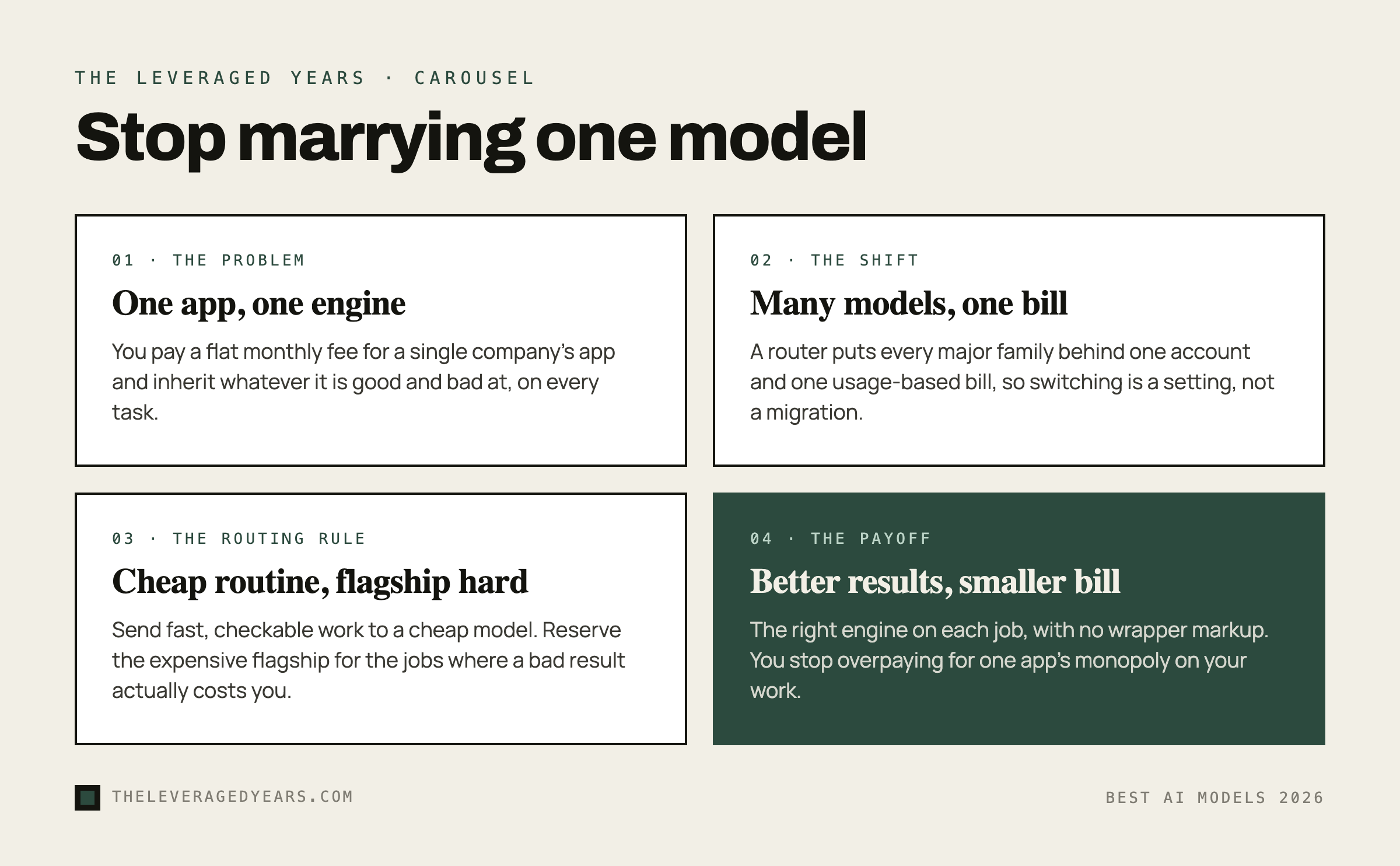
If you want one rule of thumb to route by, use this. If you can check the output yourself in under a minute, send the task to a cheap, fast model. If a bad result would cost you ten minutes or more to fix, reach for a premium flagship. And if you are running the same structured task hundreds of times, test an open-weight model and optimize for cost. That single habit captures most of the savings.
Notice what this map implies: no single model wins every row. That is the central, money-saving insight of this whole briefing.
You do not have to marry one model
Here is the part the leaderboards and the app subscriptions both quietly hope you miss. You are not required to pick one model and pledge loyalty. The honest answer to "which is best" is "best at what, for how much," and the smartest setup uses several, each for the jobs it does well.
The obstacle used to be friction. Every lab had its own account, its own billing, its own interface, and juggling four of them was a chore, so most people just defaulted to one app and one bill. That friction is now largely solved by a model router, which is a single service that gives you access to many models from many labs through one account and one bill, letting you send each task to whichever model fits. OpenRouter is the best-known of these, and it changes the economics of this entire question: instead of paying a flat monthly fee for one company's app and being stuck with whatever it is good and bad at, you pay for what you use and pick the right engine per task.
This is exactly the skill our Practical OpenRouter course teaches: how to access the major model families through one account, how to route the cheap routine work to cheap models and reserve the expensive flagship for the jobs that need it, and how to stop overpaying for a single app's markup. It is the most direct way to turn the "which model is best" question into "I use the best one for each job and pay less overall." If you are not sure whether that is the right starting point for where you are, our course finder quiz will point you at the right one, and the full course catalog lays out the options.
How to avoid paying for hype
A handful of habits keep you from overspending on models you do not need.
Distrust the leaderboard as a buying signal. Benchmarks measure narrow, often academic tasks, and a model can top one while being mediocre at your actual work. Use leaderboards to know who is in the conversation, never to make the final call.
Your most powerful tool is a head-to-head test. Before you commit to any model, take an afternoon. Grab three or four real tasks from your week, run them through two or three candidate models, and judge the output yourself against your own standards. That single afternoon of testing is worth more than every benchmark and ranking article combined, including this one.
Stop paying flagship prices for routine work. The single most common waste is running every small task through the most expensive model out of habit. Most of what you do does not need the flagship.
Watch for the wrapper markup. Plenty of apps are a thin layer over a model you could access directly for less. If a product's only real feature is a nicer text box around an engine you already pay for, you are paying twice.
Do not over-commit while the field moves this fast. The leader changes often. Any setup that lets you switch models easily, like a router, is more valuable than betting everything on whichever name is on top today. For the broader question of getting a whole team to adopt this well rather than just picking an engine, our companion piece on Claude versus ChatGPT for business goes deeper on choosing between the two most common defaults.