Turn this briefing into a supervised daily process with Claude
Claude Cowork walks professionals through building a structured AI workflow that handles real delegation, not demos.
You have probably seen the videos. Someone types one sentence, leans back, and a few minutes later ChatGPT has booked a restaurant, built a slide deck, and ordered groceries while they sip coffee. It looks like magic. It is also, mostly, theater.
The viral demo and the useful tool are two different things. A demo is built to look effortless on a task that was chosen because it photographs well. Real professional work is messier. It has constraints, judgment calls, and consequences if you get it wrong. The question that actually matters is not "can an agent do something impressive on camera." It is "what can I safely hand to an agent on a Tuesday afternoon, while I do something more valuable, and trust the result enough to use it."
This is a practical guide to that question. We will cover what ChatGPT agent mode genuinely is, the kinds of tasks worth delegating to it, the kinds it will quietly botch, how to supervise it without hovering, and the judgment you need so you are not pasting confident nonsense into a client deliverable. No hype. Just what works.
What an agent actually is (beyond the chat box)
Regular ChatGPT answers you. An agent does things. That is the whole difference, and it is a big one.
When you put ChatGPT into its agentic mode, you are giving the model access to a kind of virtual computer of its own. Depending on your plan and what you connect, it can work in a browser, run code, handle files, and read from tools you grant it, such as your email or cloud drive. Instead of writing you instructions for a ten-step task, it attempts the steps itself, narrating what it is doing as it goes. The exact capabilities, names, and limits shift release to release, so treat the specifics you read anywhere, here included, as a snapshot and check what your own account actually offers.
Two things about this are worth understanding before you trust it with anything.
First, it works in a loop. The agent looks at the screen, decides on a next action, takes it, looks again, and repeats. This is powerful and also fragile. Each step depends on the one before it reading correctly. A cookie banner, a surprise login wall, or a redesigned page can throw it off course in ways a person would shrug past.
Second, it is designed to pause. A well-built agent stops and asks before doing anything with real consequences, such as submitting a purchase or sending a message, and it hands control back to you when something needs a human, like typing a password. That handoff is not a limitation to route around. It is the feature that makes the whole thing usable at work. The moment you start clicking past those checkpoints without reading them, you have turned a careful assistant into a liability.
If you are completely new to working this way, it helps to first get comfortable with plain AI use before you hand over the keys. Our primer on how to use AI at work covers the everyday, answer-me-a-question level. This piece picks up where that one ends, at the task level, where the AI acts on your behalf.
The tasks actually worth delegating
The agent earns its keep on work that is real but rote: clearly defined, low-stakes if imperfect, and tedious enough that you would happily never do it again. Here are the categories that hold up in practice.
Structured research and collection
This is the strongest, safest use. You need the same handful of facts about thirty companies, or a comparison of five vendors across the same criteria, or every published price in a category pulled into one table. An agent can grind through that visiting, reading, and copying for half an hour while you do something else, and hand you a tidy starting point. You still verify the important cells, but the soul-deadening collection work is done.
The key word is structured. "Find me everything about X" produces mush. "For each of these twelve firms, get the founding year, headcount range, and headquarters city, and put it in a table" produces something you can use.
First-draft assembly from sources
Turning gathered material into a first version of a deliverable is a genuine strength. A briefing document from several articles, a slide outline from a report, a summary memo that pulls from three threads. The agent does the assembly and the donkey work of formatting. You bring the judgment about what matters, the framing, and the parts that need to be exactly right. As always, the first draft is cheap and the editing is where your value lives.
Repetitive web chores
Filling the same form across many sites, checking a list of links for which ones are dead, gathering your own data scattered across tools into one place. These are the unglamorous tasks that eat an afternoon and require almost no thought, which is exactly why handing them off feels so good.
Reformatting and conversion drudgery
Take this messy export and turn it into a clean table. Pull the addresses out of these hundred records. Convert this list into that structure. Mechanical, rule-based transformation is squarely in the agent's wheelhouse, and the failure modes are easy to spot because the output is something you can eyeball.
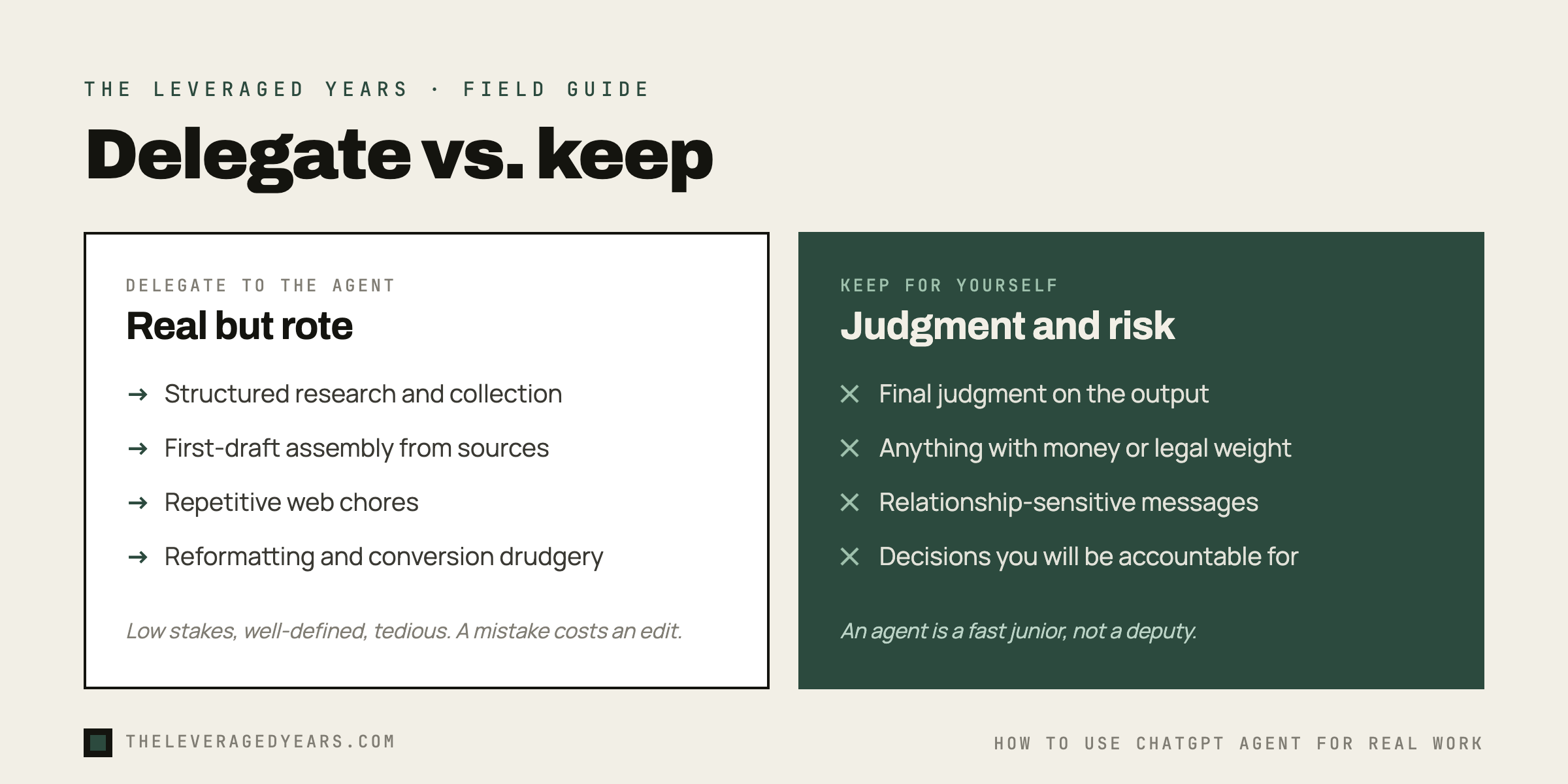
Notice the through-line. Every good use is something you could hand a capable intern with clear instructions, where a mistake costs you an edit, not your reputation. That is the right mental model. The agent is a fast, willing junior who never gets bored, not a deputy you can stop checking.
Getting good at that working relationship is its own craft: delegating to an AI agent, supervising it well, and knowing when to trust the output. It is a more durable skill than collecting prompts, and it is the entire focus of our Claude Cowork course, which teaches a tool-agnostic way of working with an agent that carries straight over to ChatGPT.
What it is quietly bad at
The demos never show you these, so you find out the hard way. Better to know going in.
It is bad at anything requiring real-time judgment about consequences. It does not feel the weight of a decision the way you do. It will book the slightly wrong flight with the same calm confidence it would book the right one, because it cannot tell that one of those outcomes is a problem and the other is fine.
It is bad at tasks where being subtly wrong is worse than being obviously wrong. If it fails outright, you notice. The danger is the result that looks completely finished and is quietly off: a number transposed, a source misread, a step skipped on page four of a long task. Polished and wrong is the worst combination, and agents produce it readily.
It struggles when the web fights back. Logins, captchas, paywalls, two-factor prompts, and pages that change between visits all trip it up. It may stall, or worse, improvise a workaround that is not what you wanted. The longer and more multi-step the task, the more chances for one bad step to poison everything after it.
And it will not question a flawed premise the way a good colleague would. Ask it to do something subtly unwise and it will usually just do it, briskly and well, which means your instructions have to carry the judgment the agent lacks. That is its own discipline, and we cover it in judgment engineering, not prompt engineering.
How to supervise an agent without hovering
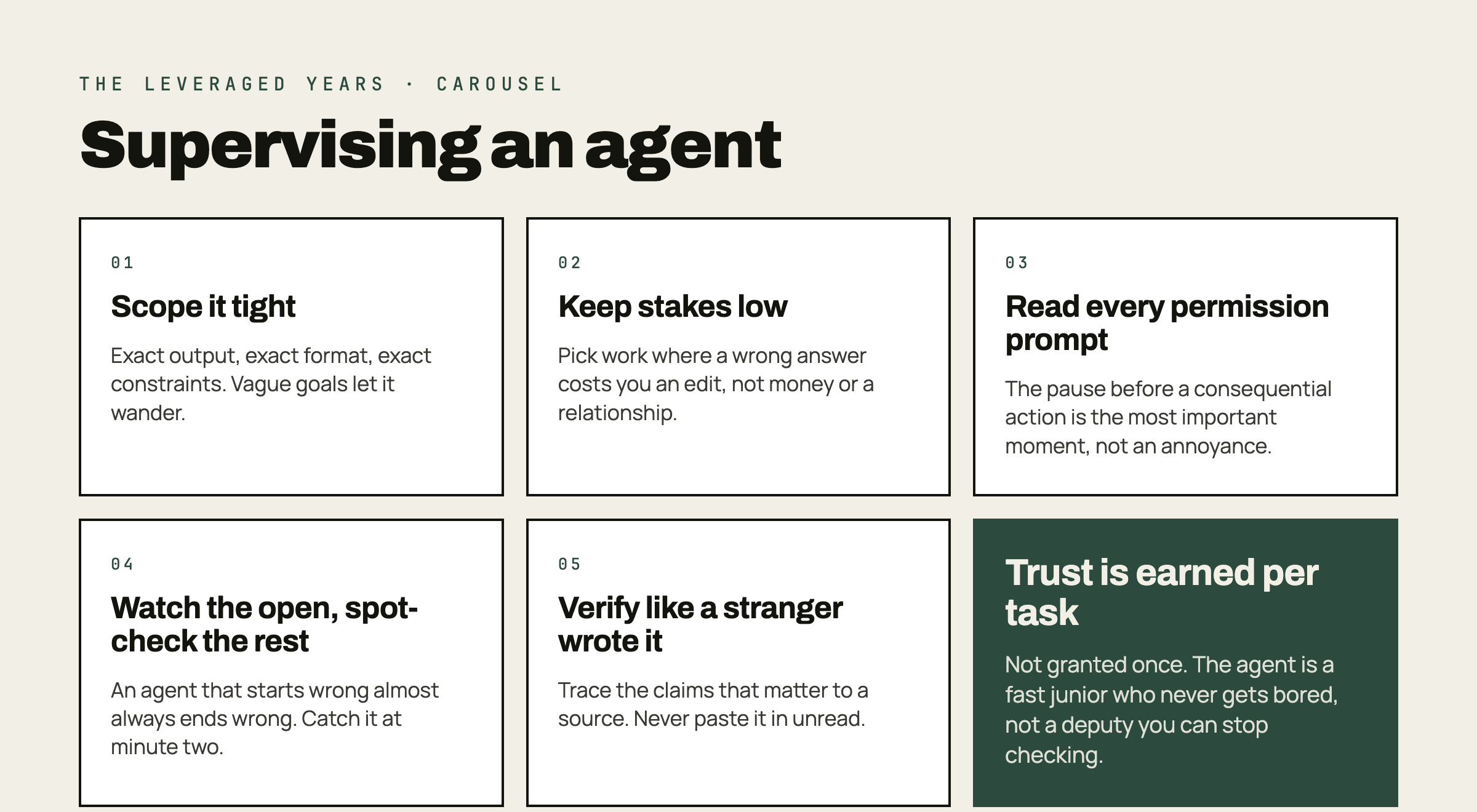
The skill is not writing one perfect instruction and walking away. It is setting the task up so that when something goes wrong, and it will, the damage is small and visible. A few habits do most of the work.
Scope it tightly and concretely. Vague goals give the agent room to wander. Tell it exactly what output you want, in what format, with what constraints. "Research our competitors" is a recipe for a wasted half hour. "List these six named competitors, and for each give me their headline price and one-line positioning from their homepage, in a table" gives it a target it can hit and you can check.
Keep the stakes low by design. For your first real tasks, pick work where a wrong answer costs you an edit, not money or a relationship. Build trust in the tool on collection and drafting before you ever let it near a checkout button or a send button.
Read the permission prompts. Every time. When the agent pauses to ask before doing something consequential, that is the most important moment in the whole interaction, not an annoyance to dismiss. Read what it is about to do. The whole safety model collapses the instant you start reflexively approving.
Watch the first few minutes, then spot-check. You do not have to stare at the whole run. But glance at the early steps to confirm it understood the task and is on a sane path. An agent that starts wrong almost always ends wrong, and you would rather catch that at minute two than minute twenty.
Verify the output as if a stranger produced it. Because, in effect, one did. Trace the important claims back to a source. Check the numbers that matter. Never paste an agent's work straight into something with your name on it without a human read. Treat its output as a confident draft, never as a verified fact.
Do you even need the agent for this?
Worth asking before every task, because the honest answer is often no. A lot of work that feels agent-shaped is faster as a normal conversation with the AI, or faster done yourself.
Agents shine when a task is genuinely multi-step, repetitive across many items, and would otherwise eat real time. For a single question, a quick draft, or a one-off lookup, plain chat is faster and you stay in control. The overhead of setting up an agent run, watching it, and verifying it only pays off when the task is big or repetitive enough to earn that overhead. Reserve the heavy machinery for the heavy jobs.
There is also the matter of which tool. ChatGPT's agent is one capable option among several, and the differences matter more for some kinds of work than others. We compare the practical tradeoffs for professional use in Claude vs. ChatGPT for business, if you are deciding where to invest your habits.
If you are not sure which skills or tools fit your role, our course finder quiz points you to the right starting place in a couple of minutes, and the full course catalog lays out the paths from beginner footing to working fluently alongside an AI agent.
The real skill is knowing when to trust it
Here is the uncomfortable truth the demos hide. The hard part of using an agent well is not getting it to do the task. The tools are good enough that it usually will. The hard part is knowing, for any given piece of output, whether you can trust it enough to act on it.
That comes from reps, not a prompt library. Before you act on any agent output, three questions settle it: can you spot-check the facts that matter against a real source, did the agent show enough of its work for you to follow it, and what does it cost you if the result is subtly wrong. Run that check enough times and you build the instinct for which tasks are safe to hand over and which are traps. The professionals who get real leverage out of agents are not the ones with the cleverest setups. They are the ones who have learned exactly how far to trust the machine, and never an inch further.
Start small. Hand it something rote and low-stakes this week, watch how it works, and check its output ruthlessly. Do that a dozen times and you will develop the single most valuable thing here, which is a calibrated sense of when the agent is genuinely saving you time and when it is just generating confident-looking work for you to clean up later.