Learn to prompt AI for work that sounds like you
The Leverage Starter gives experienced professionals new to AI a structured process for writing prompts that produce usable, professional output.
Here is the strange thing about AI at work right now. Almost everyone has tried it, and almost no one is sure they are using it well. You open the chat box, you type something, you get back four paragraphs of competent, slightly soulless text, and you think: is this actually helping me, or am I just generating homework for myself to clean up later?
If that is you, good. That instinct is the difference between people who get real leverage out of AI and people who quietly stop using it after two weeks. The professionals who win with these tools are not the ones who memorize clever prompts. They are the ones who understand what the tool is for, hand it the right kind of work, and keep their own judgment switched on the entire time.
This is a practical primer for senior people who are newish to using AI day to day. No hype, no jargon, no promises that a chatbot will run your job. Just a clear mental model, the handful of everyday uses that actually pay off, how to ask for things in plain language, what you should never trust it with, and how to stop your output from reading like it came off an assembly line.
Start with the right mental model: assistant, not oracle
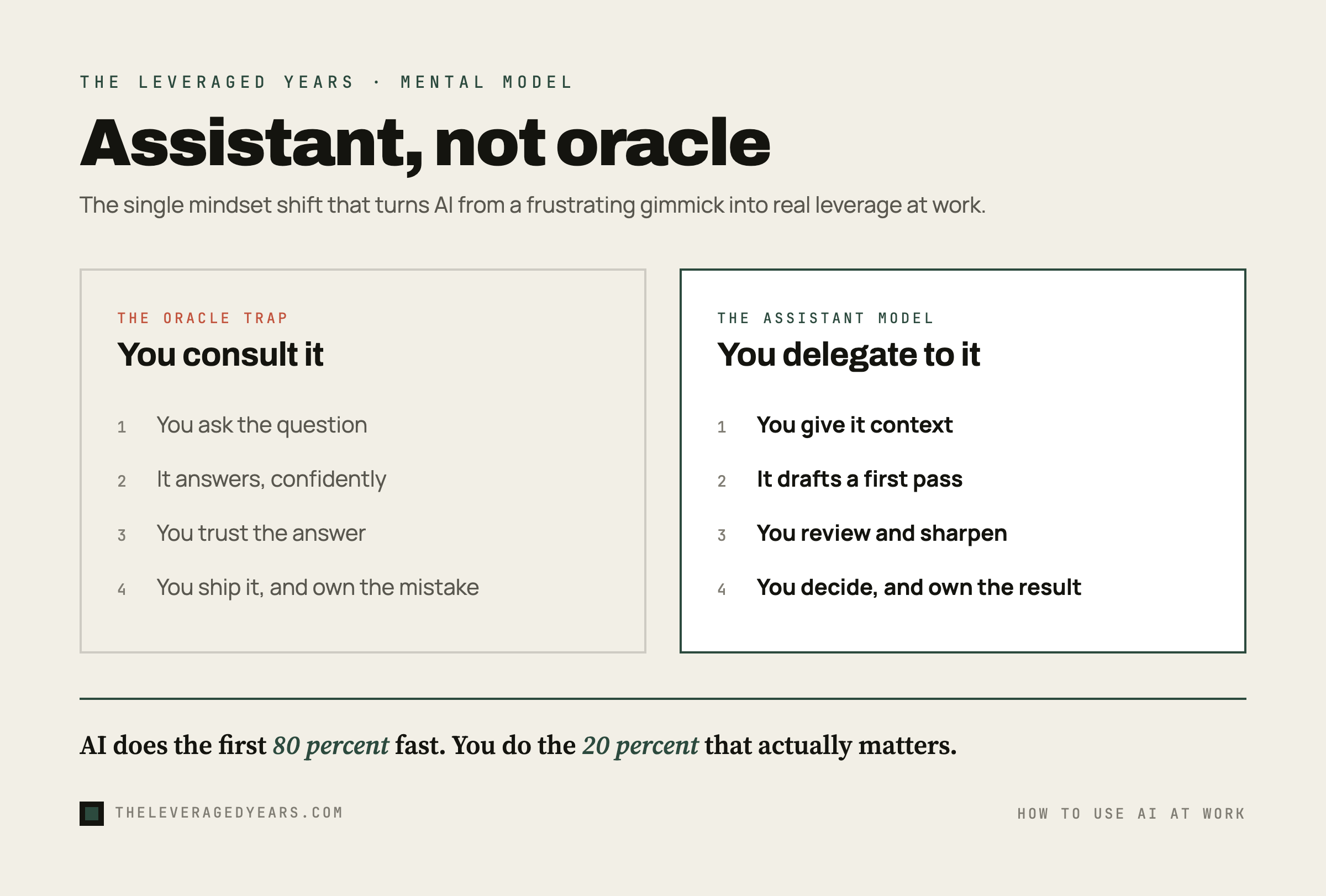
Most early frustration with AI comes from one quiet mistake. People treat the tool like an oracle, a machine that knows the answer, when it is far more useful to treat it like a fast, eager, slightly overconfident assistant.
An oracle is something you consult. You ask the question, you receive the truth, you act on it. That framing gets you in trouble, because a language model does not "know" facts the way a reference book does. It predicts plausible text. Often plausible and correct line up. Sometimes they do not, and the tool will be just as confident either way.
An assistant is different. You delegate to an assistant. You give it context, you let it take a first pass, you review the work, and you stay responsible for the result. A good assistant saves you an enormous amount of time on the first eighty percent of a task. It does not replace the judgment you bring to the last twenty percent, which is usually the part that matters. When you are ready to let the assistant run a whole task on its own, see how to use ChatGPT agent mode.
Hold that one idea and most of the confusion clears up. You stop asking "is the AI right?" and start asking "is this draft a useful starting point I can sharpen?" You stop expecting magic and start getting leverage.
The handful of everyday uses that actually pay off
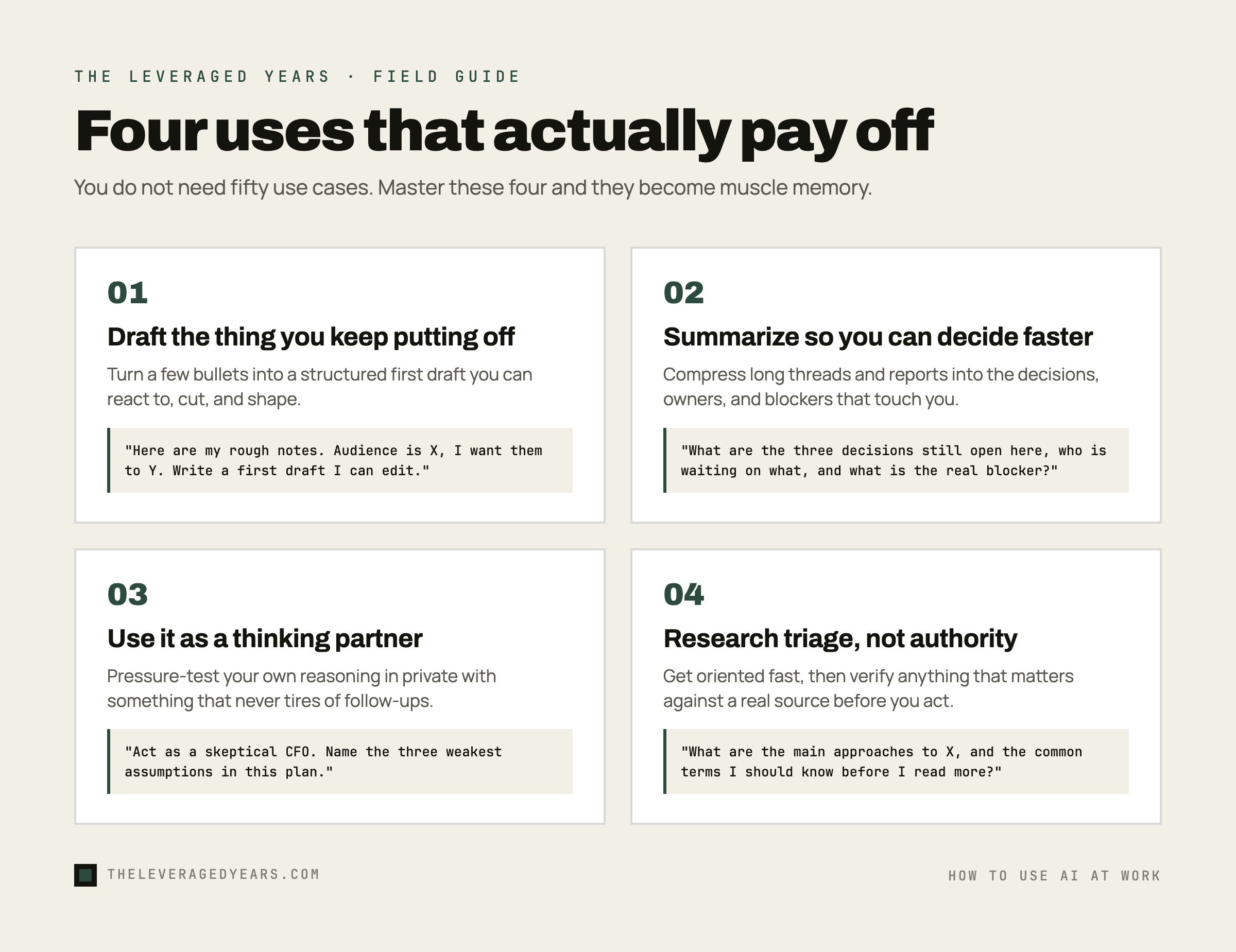
You do not need fifty use cases. You need four or five that fit the work you already do, used often enough to become second nature. Here are the ones that earn their keep for most professionals.
Drafting the thing you keep putting off
The blank page is expensive. A first draft is cheap. AI is very good at turning a few bullet points into a structured starting version of an email, a proposal, a policy summary, a job description, or a set of meeting notes. You are not asking it to write the final piece. You are asking it to get something on the page so you can react, cut, and shape. Reacting to a draft is far faster than producing one from nothing.
A simple move that works: paste your rough notes, say who the audience is and what you want them to do, and ask for a first draft you can edit. Then you do the editing, because that is where your voice and judgment live.
Summarizing so you can decide faster
You are drowning in long documents, threads, and reports that you do not have time to read in full. AI is genuinely strong at compression. Paste a long email chain and ask a pointed question: what are the three decisions still outstanding, who is waiting on what, and what is the actual blocker. Drop in a forty page report and ask for the key arguments and what a skeptic would push back on. Hand it the transcript of a call and ask what was agreed and who owns what.
The win here is not just time saved. It is that a good summary surfaces the questions you should be asking, which is exactly what a senior person is paid to do.
Using it as a thinking partner
This is the use case most people miss, and it might be the most valuable. AI is a tireless sparring partner. Before a difficult performance review, ask it to role play as the employee and voice their likely objections. Before you finalize a budget, ask it to act as a skeptical CFO and name the three weakest assumptions in your plan. When you are stuck, describe the problem out loud and ask it to ask you clarifying questions instead of answering.
You are not outsourcing the thinking. You are pressure testing your own, fast, in private, with something that never gets tired of the tenth follow up question.
Research triage, not research authority
AI is a good place to start a research question and a bad place to end one. Use it to get oriented fast: what are the main approaches to this, what are the common terms in this field, what should I be reading. Then go verify anything that matters against a real source before you act on it or repeat it. Treat its answers as a map, not as the territory.
If you want a small, memorized set of starting points for these jobs, our roundup of ChatGPT prompts for work gives you templates you can paste in and adapt instead of starting cold.
How to ask for things without learning a single trick
There is a whole cottage industry selling "prompt secrets." You do not need most of it. Clear instructions to an AI look a lot like clear instructions to a sharp new hire. If you can brief a person well, you can prompt well.
Three habits cover almost everything:
Give context before you give the request. Do not open with "write an email." Open with who you are, who it is going to, what happened, and what you want to happen next. The tool cannot read your situation. The more it knows, the less generic it sounds.
Say what good looks like. Tell it the length, the tone, the format, and the audience. "Keep it under 150 words, warm but direct, for a client who is already annoyed" produces something usable. "Make it professional" produces wallpaper.
Treat it as a conversation, not a vending machine. Your first answer is a starting point. Say what is off. "Too formal." "Cut the intro." "Make the second point the first point." The back and forth is where the real quality comes from, and it takes seconds.
That is most of the skill. If you want ready made starting points for common work tasks, our roundup of practical ChatGPT prompts gives you templates you can adapt instead of starting cold.
What to never trust it with
Knowing what to hand the assistant matters less than knowing what to keep on your own desk. A few hard lines worth holding.
Anything confidential or regulated. Do not paste client data, employee records, unreleased financials, passwords, or anything covered by a contract or a law into a consumer AI tool unless your organization has approved that tool for it. Assume that what you type may be stored or accessed by the provider, and possibly used to improve the model, unless your organization has approved a specific tool or set up a private deployment with different guarantees. If you would not email it to a stranger, do not paste it.
Facts, names, numbers, and citations you have not checked. AI will produce a confident statistic, a plausible quote, or a real looking source that does not exist. This is one of the most common ways smart people get embarrassed. Verify anything factual before it leaves your hands. The tool is a drafting aid, not a fact checker.
Final judgment calls. Hiring decisions, legal interpretations, medical or financial advice for real situations, anything with consequences. Use AI to think it through. Do not use it to make the call. The accountability stays with you, and so should the decision.
Your relationships. A condolence note, a difficult apology, sensitive feedback to a person who reports to you. The moment it feels generated, it does the opposite of what you wanted. Some things are supposed to cost you a little effort. That cost is the message.
When you are choosing between tools for sensitive or serious work, it is worth understanding how they differ in practice. Our comparison of Claude versus ChatGPT for business breaks down where each one fits, and our skeptic's shortlist of the best AI tools covers which categories are worth paying for at all.
How to not sound like a robot
Here is the part nobody warns you about. The biggest risk of using AI at work is not that it gives you a wrong answer. It is that it gives you a fine answer that sounds like everyone else's fine answer, and your colleagues can tell.
AI writing has a smell. Over polished, oddly cheerful, full of empty connective phrases, three examples where one would do, and a tidy summary that restates what it just said. Readers have learned to spot it, and once they do, your credibility quietly drops. You do not want your name on assembly line prose.
The fix is not to stop using AI. The fix is to use it for the draft and keep yourself in the final edit. A few moves that work:
Cut the throat clearing. AI loves to warm up. Delete the first sentence or two and you usually land on the real point faster.
Put your own specifics back in. The thing the tool cannot know is the texture of your actual situation: the client's name, what happened on Tuesday, the number that surprised you. Specifics are what make writing sound like a person.
Read it out loud. If a sentence is something you would never say to a colleague's face, rewrite it the way you would say it. Your spoken voice is almost always more human than the polished default.
Kill the filler vocabulary. Phrases that show up far more in machine text than in human speech are a tell. You know the type: corporate filler like "leverage synergies" or "foster innovation," and stock openers about a fast moving world. Replace them with the plain thing you actually mean.
The goal is simple. Let the tool do the heavy lifting on structure and speed. Keep the voice, the judgment, and the specifics yours. That combination is what separates someone who clearly uses AI well from someone who clearly let the AI write it.
Where to go from here
You do not build this from reading alone. You build it by picking one task this week, handing the first draft to an AI, and editing it back into your own voice. Do that ten times and the assistant, not oracle model becomes muscle memory.
If you want a structured way in rather than figuring it out by trial and error, The Leverage Starter is built for exactly this moment: senior professionals who are capable but new to working with AI day to day, who want the everyday uses, the prompting habits, and the judgment calls laid out in order. You can also see the full range of courses if you are looking for something tied to your specific field, or take the two minute quiz to find the right starting point.
The professionals who pull ahead in the next few years will not be the ones who used AI the most. They will be the ones who used it well: as an assistant, on the right work, with their own judgment firmly in charge.