Turn prompts into a repeatable process for inbox work
AI Email Assistant shows professionals managing heavy inboxes how to apply these core prompts to drafting, revising, and triaging messages daily.
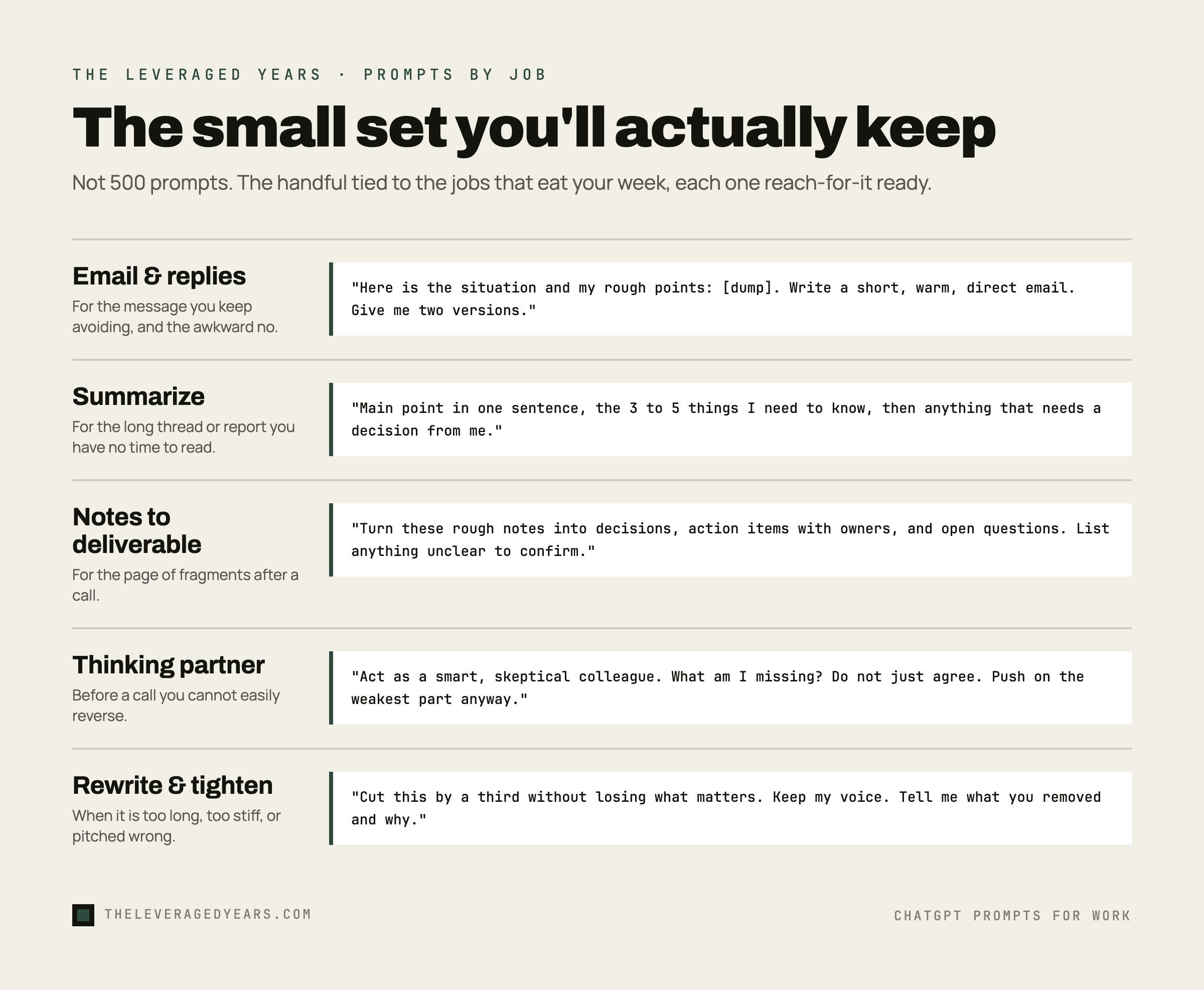
Search "chatgpt prompts" and you get lists of 500. Five hundred prompts, sorted into forty categories, most of them written to fill a page rather than to help you finish a Tuesday. Nobody uses 500 prompts. You will use maybe eight, over and over, for the handful of jobs that actually eat your week: writing the email you keep putting off, getting through a thread you do not have time to read, turning your messy notes into something a colleague can act on, thinking a decision through before you commit to it, tightening something you already wrote, and walking into a meeting prepared instead of scrambling.
This is the short list. Not the most clever prompts, the ones you will actually keep. Each one is built around a real job a working professional does most days, written so you can paste it in, swap in your own details, and get something usable on the first try instead of the fifth. We will also cover the one habit that makes any prompt better, because the prompt matters less than most people think and the way you feed it your real material matters more.
If you have ever copied a long list of prompts and never opened it again, this is the antidote. Fewer prompts, used well, beat a giant library you forget you saved. If you are still finding your footing with these tools, our primer on how to use AI at work covers the mental model these prompts sit on top of.
The one thing that separates a good prompt from a useless one
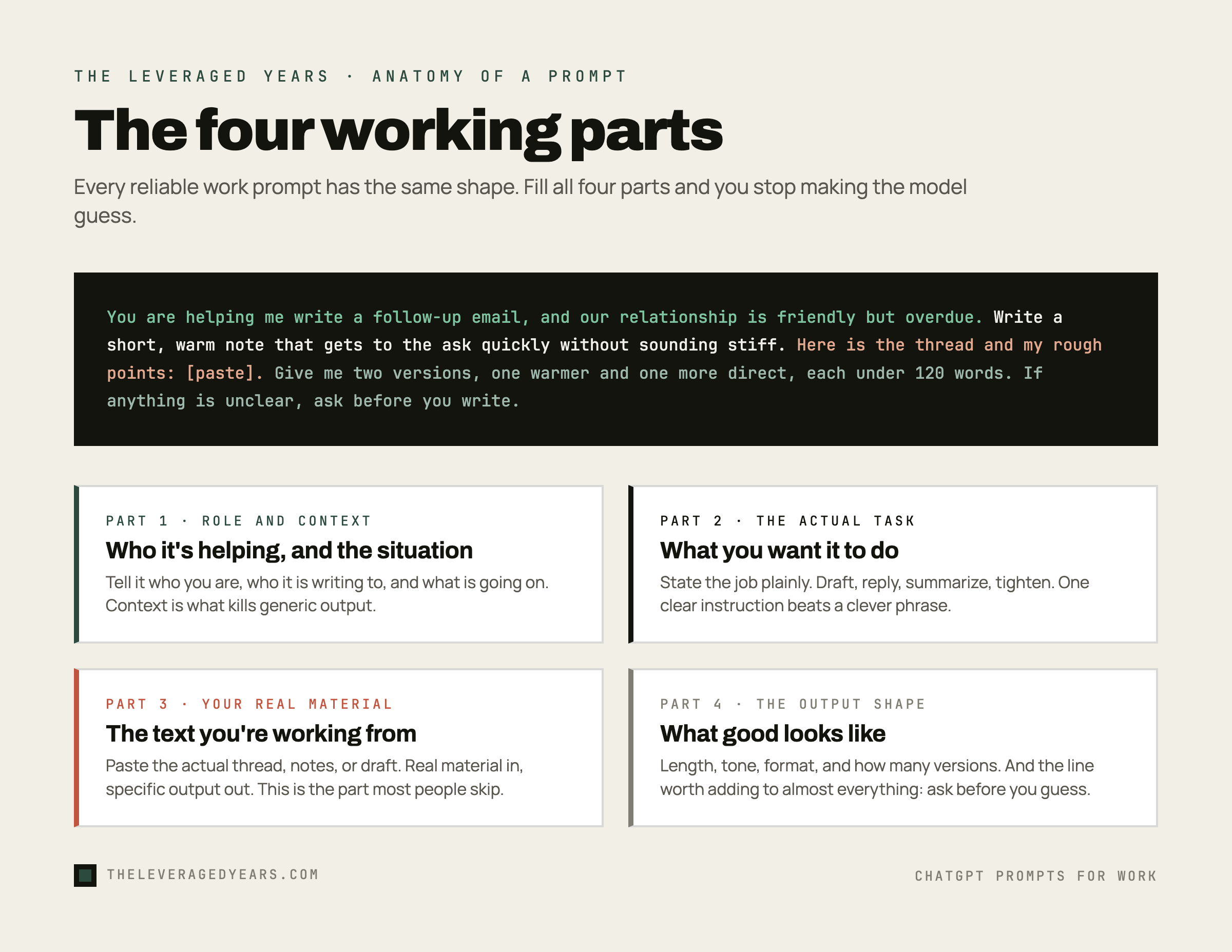
Before any specific prompt, here is the habit that does most of the work. A prompt is not a magic phrase. It is a set of instructions, and the instruction that matters most is the one most people skip: give the model your real material and tell it what good looks like.
A vague request gets a vague answer. "Write me a follow-up email" produces something generic because you gave it nothing specific to work with. The same request, fed the actual thread, your relationship with the person, and the outcome you want, produces something you can almost send as-is. The model is not guessing better. You stopped making it guess.
So every prompt below follows the same shape. You tell it who it is helping and the situation, you give it the real text you are working from, you say what the finished thing should look like, and you let it ask you questions when it is missing something. That last part matters because a model that asks before it writes produces specifics, and a model you let run blind produces filler. One instruction is worth adding to almost everything: when in doubt, I would rather you ask me a clarifying question than guess or make something up. You will see that pattern repeat in the prompts that follow, and once you internalize it you can write your own.
Email and replies: the job that eats the most time
Most professionals spend more of the day in their inbox than anywhere else, and most of that time goes to messages that are not hard, just annoying to start. These prompts get the first draft out of your head and onto the screen, where editing is fast.
Use it for the email you keep avoiding. The trick is the messy bullet dump. You do not have to write well to feed it, you just have to say what you mean, and it shapes the words.
Use it for the reply you do not know how to phrase, especially the awkward ones. Saying no, asking for more time, disagreeing without burning the relationship. The "shorter than their email" line keeps you from over-explaining, which is where most of us get into trouble. The "do not apologize more than once" line fixes the most common tell in AI-written replies, which is the reflex to soften a no into three apologies.
To adapt either of these, change the voice samples. Paste in two or three of your own past emails and the model copies your rhythm instead of defaulting to corporate beige. This is the same muscle that an AI email assistant is built to train: not generating noise, but getting a clean, on-voice draft out fast so you spend your time deciding what to say rather than how to phrase it.
Summarizing: get the point of something long without reading all of it
You do not have time to read the 40-message thread, the 12-page report, or the recording transcript before the meeting in ten minutes. You need the shape of it and the parts that touch you. These pull the signal out.
Use it for long reports, dense documents, or articles you were sent and feel guilty for not reading. The "decision or action from me" flag is the part generic summary prompts miss. You do not just want to know what it said, you want to know what it wants from you.
Use it for the thread you got added to late, where eleven people have been talking and you need to catch up in ninety seconds. It untangles who said what and, more usefully, whether the ball is in your court.
To adapt these, tell it who you are. "Summarize this for the finance lead" surfaces different things than "summarize this for the engineer." The model weighs relevance to the role you name, so name yours.
Notes to something usable: turn the mess into a deliverable
You came out of a call with a page of fragments. You have a voice memo you dictated walking to the train. You have a half-formed idea in three bullet points. The work is turning that raw material into something a colleague can read. This is where AI saves the most actual minutes.
Use it right after a call, while it is fresh. The "to confirm" section is the safety valve. It stops the model from inventing certainty your notes did not have, which is exactly the failure that makes people distrust AI output.
Use it when you are staring at a blank page with a full head. Getting from nothing to a rough draft is the hardest part, and this is the prompt that clears it. The draft will not be final. It does not need to be. It needs to exist so you can fix it.
To adapt, name the format. "As a one-page brief," "as a Slack message," "as five bullet points for a slide" all change the output shape. Tell it the container and it fills the container.
The thinking partner: pressure-test a decision before you commit
This is the use most people never try, and it is the one that separates AI as a writing tool from AI as a genuinely useful colleague. You are about to make a call. You want someone to poke holes in it before reality does. The model will not decide for you, and it should not, but it is a tireless and unflinching sounding board.
Use it before a decision you cannot easily reverse. The "do not just agree with me" line is essential, because the default behavior of these tools is to be agreeable, and agreeable is useless when you need a real stress test.
Use it when you suspect you have already made up your mind and want to check whether that is conviction or just momentum. Steelmanning the other side is uncomfortable, and that discomfort is usually a sign you have found something real to deal with.
To adapt, hand it a role with stakes. "Act as the CFO who has to approve this budget" or "act as the customer who is about to churn" gives the pushback a specific point of view instead of generic devil's advocacy. The more real the role, the more useful the friction. Knowing which pushback to take seriously and which to wave off is its own skill, and it is closer to the heart of working well with these tools than any prompt trick. That is the difference between memorizing prompts and developing judgment about when to trust the output.
Rewriting and tightening: make it shorter, clearer, or fit for a different reader
You already wrote the thing. It is too long, too stiff, or pitched at the wrong person. These fix what exists rather than starting over, which is faster and keeps your voice intact.
Use it on anything that runs long: the email that grew three paragraphs too many, the doc nobody will finish. The "tell me what you removed" line keeps you in control instead of trusting a black box, and you will often agree with most of the cuts and rescue one or two.
Use it when the same message has to land with different people. The executive wants the bottom line in the first line. The new hire needs the context you have internalized. One source, several readers, one prompt.
To adapt, stack the instructions. "Cut by a third, then rewrite for a skimming executive, then give me a one-line subject" chains the moves in order. The model handles a sequence well as long as you give it one clear step at a time.
Meeting prep: walk in five minutes ahead instead of five minutes behind
The meeting is in fifteen minutes and you have not thought about it. This is the fastest way to walk in prepared rather than reacting.
Use it before any meeting you walked into cold, especially the ones where someone wants something from you and you need to know your own position before they pitch theirs. It will not replace knowing your business. It organizes what you already know so you are not assembling it live in the room.
To adapt, ask for the other side. "Now tell me what they probably want and where our interests might not line up" turns prep into light negotiation prep, which is often what these meetings really are.
Why a small set beats a giant library
Knowing which jobs in your week are worth handing off, feeding the model your real material instead of a vague wish, and editing the output with judgment instead of shipping the first draft is what actually moves the needle. The people who get the most out of these tools are not the ones with the biggest prompt collection. They are the ones who built a small set of reliable moves and got fast at them. If you are weighing which assistant to build those habits in, the practical differences between Claude and ChatGPT for everyday business work are worth knowing before you commit your routine to one, and our skeptic's shortlist of the best AI tools covers the rest of the stack.